
Toyota Tacoma (2015-2018) Service Manual: Dtc Check / Clear
DTC CHECK / CLEAR
NOTICE:
When the diagnosis system is changed from normal mode to check mode or vice versa, all DTCs and freeze frame data recorded in normal mode are cleared. Before changing modes, always check and make a note of DTCs and freeze frame data.
HINT:
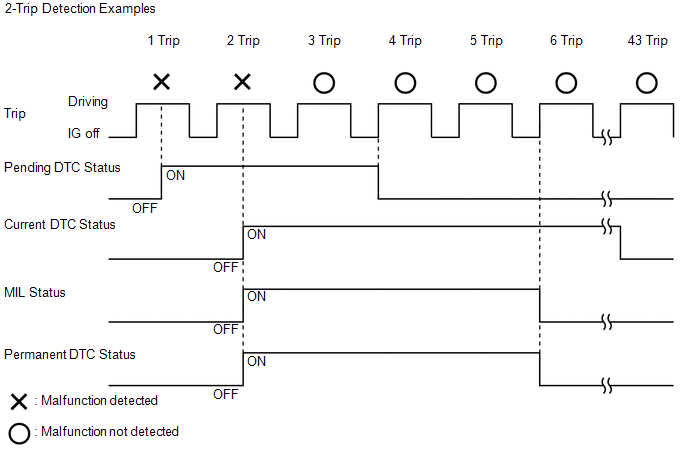
- DTCs which are stored in the ECM can be displayed on the Techstream. The Techstream can display current, pending and permanent DTCs.
- If a malfunction is detected during the current driving cycle, current and permanent DTCs are stored.
- Some DTCs are not stored if the ECM does not detect the same malfunction again during a second consecutive driving cycle. However, such malfunctions, detected on only one occasion, are stored as pending DTCs.
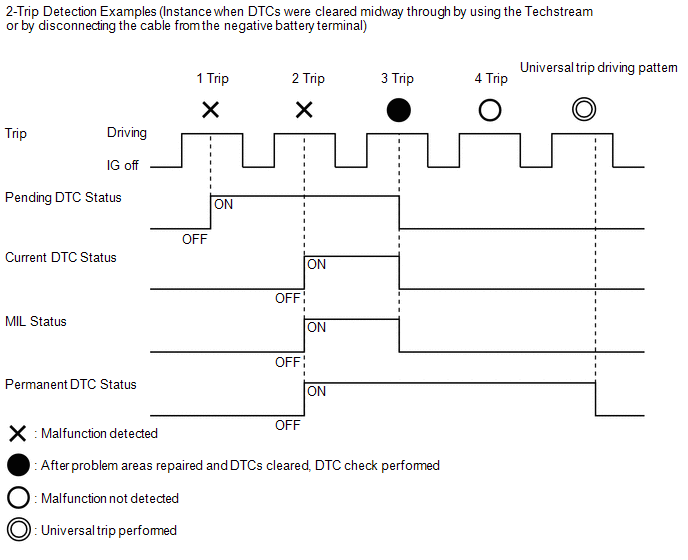
- Current and pending DTCs can be cleared by using the Techstream or by disconnecting the cable from the negative battery terminal. However, permanent DTCs cannot be cleared using either of these two methods.
- After clearing current DTCs using the Techstream (or by disconnecting the cable from the negative battery terminal), permanent DTCs can be cleared when the system is determined to be normal for the relevant DTCs and then the universal trip is performed.
|
Pending DTC |
Store condition |
Malfunction detected |
|
Clear condition |
System determined to be normal or DTCs cleared using Techstream or Cable disconnected from negative battery terminal |
|
|
Current DTC |
Store condition |
Malfunction detected (2nd trip) |
|
Clear condition |
No malfunctions in 40 driving cycles or DTCs cleared using Techstream or Cable disconnected from negative battery terminal |
|
|
Permanent DTC |
Store condition |
Malfunction detected (2nd trip) |
|
Clear condition |
Ignition switch to ON after no malfunction is detected in 3 consecutive driving cycles or After DTCs cleared using Techstream or cable disconnected from negative battery terminal, malfunction not detected when universal trip driving performed |
|
|
MIL |
ON |
Malfunction detected (2nd trip) |
|
OFF |
Ignition switch to ON after no malfunction is detected in 3 consecutive driving cycles or DTCs cleared using Techstream or Cable disconnected from negative battery terminal |
1. CHECK DTC
(a) Connect the Techstream to the DLC3.
(b) Turn the ignition switch to ON.
(c) Turn the Techstream on.
(d) Enter the following menus: Powertrain / Engine and ECT / Trouble Codes.
(e) Check the DTC(s) and freeze frame data, and then write them down.
(f) Check the details of the DTC(s) (See page .gif) ).
).
2. CLEAR DTC (Pending and Current DTC)
(a) Connect the Techstream to the DLC3.
(b) Turn the ignition switch to ON.
(c) Turn the Techstream on.
(d) Enter the following menus: Powertrain / Engine and ECT / Trouble Codes.
(e) Clear the DTCs.
3. CLEAR PERMANENT DTC
HINT:
Even if the following procedure is not performed, permanent DTCs are cleared if no malfunction are detected during 3 consecutive driving cycles.
(a) Connect the Techstream to the DLC3.
(b) Turn the ignition switch to ON.
(c) Turn the Techstream on.
(d) Enter the following menus: Powertrain / Engine and ECT / Trouble Codes.
(e) Check if permanent DTCs are stored.
HINT:
If permanent DTCs are not output, it is not necessary to continue this procedure.
(f) Clear the DTCs.
(g) Perform the universal trip.
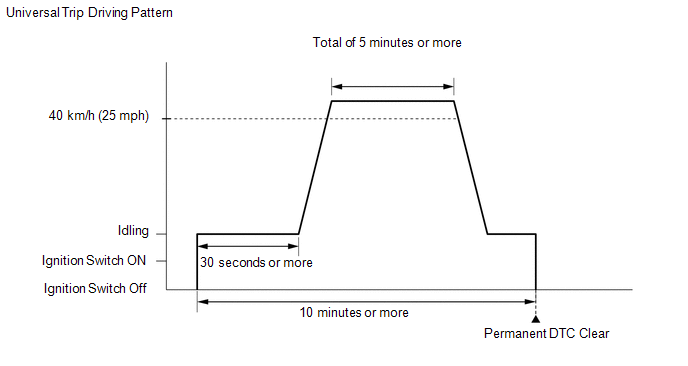
(1) Idle the engine for 30 seconds or more.
(2) Drive the vehicle at 40 km/h (25 mph) or more for a total of 5 minutes or more.
HINT:
- It is possible to complete the drive pattern even if the vehicle decelerates to less than 40 km/h (25 mph) during the driving cycle provided that the vehicle is driven at 40 km/h (25 mph) or more for a total of 5 minutes.
- When accelerating through the gears, make sure the vehicle is driven so all gears are used in order and no gears are skipped.
(3) Allow 10 minutes or more to elapse from the time the engine is started.
(h) Turn the ignition switch off.
(i) Wait 15 seconds.
(j) Turn the ignition switch to ON.
(k) Enter the following menus: Powertrain / Engine and ECT / Trouble Codes.
(l) Check that the permanent DTCs have been cleared.
HINT:
- If permanent DTCs have not been cleared, perform the universal trip again.
- Permanent DTCs are cleared when the universal trip is completed.
 Diagnosis System
DIAGNOSIS SYSTEM
1. DESCRIPTION
(a) When troubleshooting OBD II (On-Board Diagnostics) vehicles, an OBD II scan
tool (complying with SAE J1978) must be connected to the DLC3 (Data Link Connector
...
 Terminals Of Ecm
TERMINALS OF ECM
1. ECM
HINT:
The standard voltage between each pair of ECM terminals is shown in the table
below. In the table, first follow the information under "Condition". Look u ...
Other materials:
Correct driving posture
Drive in a good posture as follows:
Sit upright and well back in the
seat.
Adjust the position of the seat
forward or backward to ensure the pedals can be reached and easily depressed to
the extent required.
Adjust the seatback so that the
controls are easily operable.
Adjust the t ...
Problem Symptoms Table
PROBLEM SYMPTOMS TABLE
HINT:
Use the table below to help determine the cause of problem symptoms. If multiple
suspected areas are listed, the potential causes of the symptoms are listed in order
of probability in the "Suspected Area" column of the table. Check each symptom by
check ...
Rear Right Sensor Malfunction (C1AE9)
DESCRIPTION
The No. 1 ultrasonic sensor (rear corner sensor RH) is installed on the rear
bumper. The ECU detects obstacles based on signals received from the No. 1 ultrasonic
sensor (rear corner sensor RH). If the No. 1 ultrasonic sensor (rear corner sensor
RH) has an open circuit or other ma ...
