Components
COMPONENTS
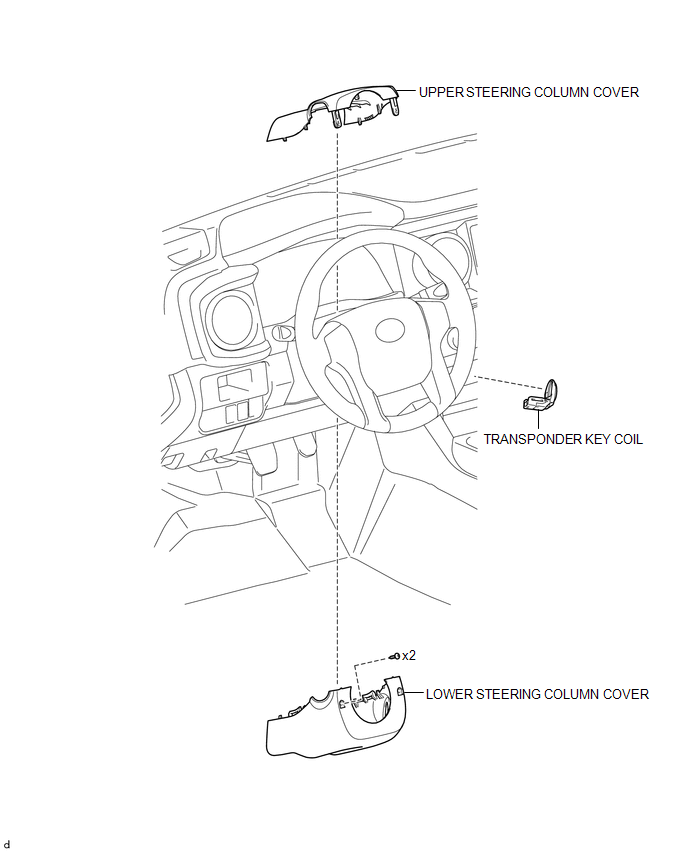
ILLUSTRATION
Installation
INSTALLATION
PROCEDURE
1. INSTALL TRANSPONDER KEY COIL
|
(a) Engage the 2 claws to install the transponder key coil. |
|
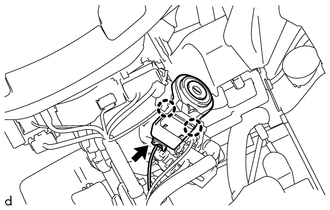
(b) Connect the connector.
2. INSTALL UPPER STEERING COLUMN COVER
(See page
)
3. INSTALL LOWER STEERING COLUMN COVER
(See page
)
Removal
REMOVAL
PROCEDURE
1. REMOVE LOWER STEERING COLUMN COVER
(See page
)
2. REMOVE UPPER STEERING COLUMN COVER
(See page
)
3. REMOVE TRANSPONDER KEY COIL
|
(a) Disconnect the connector. |
|
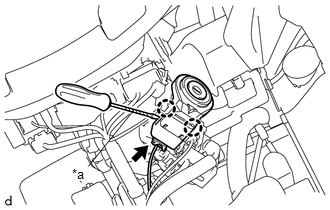
(b) Using a screwdriver with its tip wrapped in protective tape, disengage the 2 claws to remove the transponder key coil.
Text in Illustration|
*a |
Protective Tape |
Security Indicator Light Does not Blink
Transponder Key EcuData List / Active Test
DATA LIST / ACTIVE TEST
DATA LIST
HINT:
Using the Techstream to read the Data List allows the values or states of switches,
sensors, actuators and other items to be read without removing any parts. This non-intrusive
inspection can be very useful because intermittent conditions or signals may ...
Open in Driver Side Electrical Antenna Circuit (B27A1)
DESCRIPTION
The certification ECU (smart key ECU assembly) generates a request signal and
transmits the signal to the front door outside handle assembly LH [electrical key
antenna] at intervals of 0.25 seconds. For the front door outside handle assembly
LH [electrical key antenna] to detect w ...
TC and CG Terminal Circuit
DESCRIPTION
DTC output mode is set by connecting terminals TC and CG of the DLC3.
The DTCs are displayed by blinking the SRS warning light.
HINT:
Make sure that DTCs which relate to the CAN communication system are
not output. If any of these DTCs are output, check the CAN communicat ...