TERMINALS OF ECM
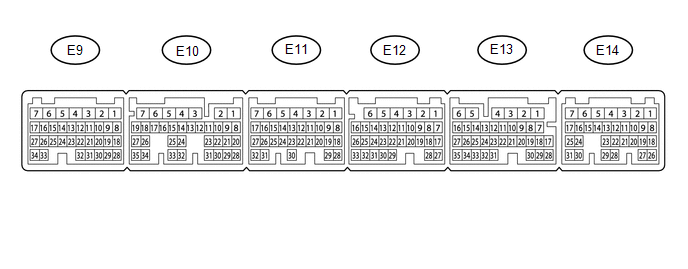
HINT:
The standard normal voltage between each pair of ECM terminals is shown in the table below. The appropriate conditions for checking each pair of terminals are also indicated. The result of checks should be compared with the standard normal voltage for that pair of terminals, displayed in the Specified Condition column. The illustration above can be used as a reference to identify the ECM terminal locations.
|
Terminal No. (Symbol) |
Wiring Color |
Terminal Description |
Condition |
Specified Condition |
|---|---|---|---|---|
|
E14-2 (BATT) - E11-1 (E1) |
L - W-B |
Battery (for measuring battery voltage and for ECM memory) |
Always |
11 to 14 V |
|
E12-6 (+BM) - E11-1 (E1) |
GR - W-B |
Power source of throttle actuator |
Always |
11 to 14 V |
|
E14-3 (+B) - E11-1 (E1) |
B - W-B |
Power source of ECM |
Ignition switch ON |
11 to 14 V |
|
E14-4 (+B2) - E11-1 (E1) |
B - W-B |
Power source of ECM |
Ignition switch ON |
11 to 14 V |
|
E14-25 (MREL) - E11-1 (E1) |
GR - W-B |
EFI-MAIN NO. 1 relay operation signal |
Ignition switch ON |
11 to 14 V |
|
E9-26 (VCNE) - E11-1 (E1) |
R - W-B |
Power source of crankshaft position sensor (specific voltage) |
Ignition switch ON |
4.5 to 5.5 V |
|
E9-25 (NE+) - E9-33 (NE-) |
B - G |
Crankshaft position sensor |
Idling |
Pulse generation |
|
E13-24 (SPD) - E11-1 (E1) |
R - W-B |
Vehicle speed signal from combination meter assembly |
Driving at 20 km/h (12 mph) |
Pulse generation |
|
E11-1 (E1) - Body ground |
W-B - Body ground |
Ground circuit of ECM |
Always |
Below 1 Ω |