Your vehicle includes a variety of electronic features that can be personalized to your preferences. Programming these preferences requires specialized equipment and may be performed by an authorized Toyota dealership.
Some function settings are changed simultaneously with other functions being customized. Contact your Toyota dealer for further details.
Customizable features
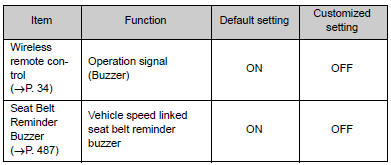
Customization
Items to initializeDoes not Play even after Bluetooth Audio Mode is Selected
CAUTION / NOTICE / HINT
HINT:
Even if the portable player can play audio content, it may not be able to play
via the in-vehicle device. This does not necessarily indicate a malfunction of the
in-vehicle device.
PROCEDURE
1.
CHECK OPERATION
(a) Check if the po ...
Parking Brake Switch Circuit
DESCRIPTION
This circuit is from the parking brake switch assembly to the radio and display
receiver assembly.
WIRING DIAGRAM
PROCEDURE
1.
CHECK VEHICLE SIGNAL
(a) Display the "Vehicle Signal Check Mode" screen (See page
).
...
Crawl Indicator Light Remains ON
DESCRIPTION
When CRAWL starts after operating the CRAWL switch (drive monitor switch), the
CRAWL indicator light turns on. While CRAWL is in the process of stopping, the CRAWL
indicator light begins blinking. When CRAWL totally stops, the CRAWL indicator light
turns off.
WIRING DIAGRAM
CA ...