The tailgate can be opened.
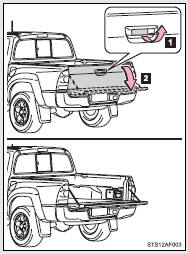
 Pull the handle
 Open the tailgate slowly
The support cables will hold the tailgate horizontal.
After closing the tailgate, try pulling it toward you to make sure it is securely locked.
Removing the tailgate
■ Before removing the tailgate (vehicles with rear view monitor system)
These connector covers are used when removing the tailgate, to prevent the back-up camera wire harness connectors from being contaminated.
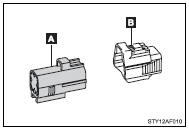
 Connector cover (Gray)
 Connector cover (White)
Store the connector covers in the glove box in a plastic bag when not using.
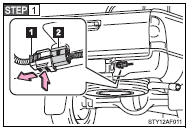
To disconnect the wire harness connectors (
 and
and
 ), press and hold the lock of the tailgate
wire harness connector (White) and pull apart.
), press and hold the lock of the tailgate
wire harness connector (White) and pull apart.
 Tailgate wire harness connector (White)
 Frame wire harness connector (Gray)
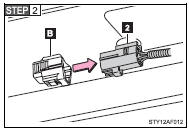
Attach the connector cover (white) to the frame wire harness connector (Gray).
 Connector cover (White)
 Frame wire harness connector (Gray)
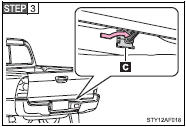
Pull out the plastic wire protector located in the vehicle bed by pressing the tabs and pulling the protector.
Be careful not to pull out all of the tailgate wire harness. Doing so may result in damage to vehicle components.
 Plastic wire protector
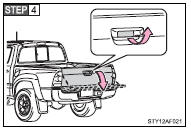
Open the tailgate.
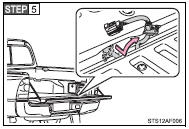
Pull out the wire harness from the vehicle bed.
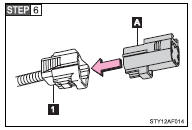
Attach the connector cover (Gray) to the tailgate wire harness connector (White).
 Tailgate wire harness connector
(White)
Tailgate wire harness connector
(White)
 Connector cover (Gray)
■ Removing the tailgate
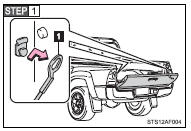
Open the tailgate to the angle where you can release the brackets on the support cables from the lugs on both sides.
Lift the support cable bracket up and slide it off.
 Support cable bracket
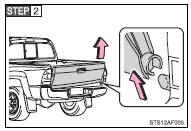
Tilt the tailgate to about 30° from vertical and pull up the right side of the tailgate to unhook the right side.
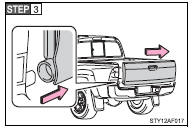
Slide the tailgate a little to the right to unhook the left side.
To attach the tailgate, follow the removal procedure in reverse order.
Rear step bumper
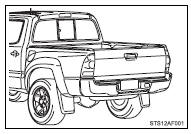
For rear end protection and easier step-up loading.
To get on the rear step bumper, use the shaded area in the illustration.
CAUTION
■Before removing the tailgate (vehicles with rear view monitor system)
Disconnect the wire harness between the back-up camera and the vehicle.
Failure to do so may result in serious injury or damage to the vehicle components.
■Caution while driving
Observe the following precautions.
Failure to do so may result in death or serious injury.
●Do not drive with the tailgate open.
●Do not let anyone ride on the rear step bumper.
NOTICE
■To prevent damage to the tailgate wire harness (vehicles with rear view monitor system)
Do not pull out all of the tailgate wire harness before open the tailgate.
■To prevent damage to the camera lens (vehicles with rear view monitor system)
Store the removed tailgate with the back-up camera lens facing upward.
■After closing the tailgate
Try pulling it toward you to make sure it is securely locked.
■To prevent damage to the rear step bumper
Do not allow more than one person to get on the rear step bumper at a time.

