Toyota Tacoma manuals

Toyota Tacoma (2015-2018) Service Manual: Removal

REMOVAL

CAUTION / NOTICE / HINT

HINT:

  • Use the same procedure for the RH and LH sides.
  • The procedure listed below is for the LH side.

PROCEDURE

1. REMOVE FRONT DOOR LOWER FRAME BRACKET GARNISH

(See page ) ) 2. REMOVE FRONT DOOR INSIDE HANDLE BEZEL PLUG )

2. REMOVE FRONT DOOR INSIDE HANDLE BEZEL PLUG

(See page ) ) 3. REMOVE FRONT ARMREST BASE UPPER PANEL SUB-ASSEMBLY )

3. REMOVE FRONT ARMREST BASE UPPER PANEL SUB-ASSEMBLY

(See page ) ) 4. REMOVE FRONT DOOR TRIM BOARD SUB-ASSEMBLY )

4. REMOVE FRONT DOOR TRIM BOARD SUB-ASSEMBLY

(See page ) ) 5. REMOVE FRONT NO. 1 SPEAKER ASSEMBLY )

5. REMOVE FRONT NO. 1 SPEAKER ASSEMBLY

(a) Disconnect the connector.
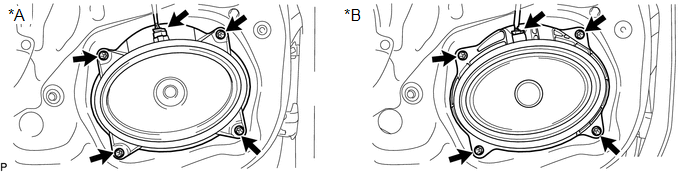
Text in Illustration

*A

w/o Amplifier Box Speaker Assembly

*B

w/ Amplifier Box Speaker Assembly

NOTICE:

Do not touch the cone part of the front No. 1 speaker assembly.

(b) Remove the 4 screws and front No. 1 speaker assembly.

Components
COMPONENTS ILLUSTRATION ...

Inspection
INSPECTION PROCEDURE 1. INSPECT FRONT NO. 1 SPEAKER ASSEMBLY (w/o Amplifier Box Speaker Assembly) (a) Measure the resistance according to the value(s) in the table below. Standard resistance: ...

Other materials:

System Voltage Circuit Short to Ground or Open (P056014)
DESCRIPTION The battery supplies power to the ECM even when the ignition switch is off. This power allows the ECM to store data such as DTC history, freeze frame data and fuel trim values. If the battery voltage falls below a minimum level, the ECM data is cleared and the ECM determines that ...

Problem Symptoms Table
PROBLEM SYMPTOMS TABLE HINT: Troubleshooting of the theft deterrent system is based on the premise that the power door lock control system, wireless door lock control system*1 and smart key system*2 are operating normally. Accordingly, before troubleshooting the theft deterrent ...

Screen Flicker or Color Distortion
PROCEDURE 1. CHECK DISPLAY SETTING (a) Reset display settings (contrast, brightness) and check that the screen appears normal. OK: The display returns to normal. OK END NG PROCEED TO NEXT SUSPECTED AREA SHOWN IN ...

В© 2011-2026 Copyright www.ttguide.net