INSTALLATION
PROCEDURE
1. INSTALL FRONT CONSOLE BOX (for Automatic Transmission)
|
(a) When installing a new front console box: Text in Illustration
(1) Using a nipper, cut off both ends of the runner portion as shown in the illustration. |
|
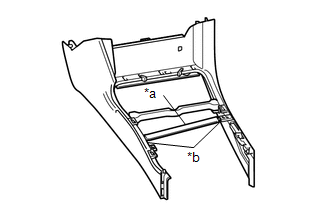
(b) Engage the 4 guides and 3 clips to install the front console box.
(c) Install the 3 screws.
(d) w/ Wireless Charger:
(1) Connect the connector.
2. INSTALL FRONT CONSOLE BOX (for Manual Transmission)
|
(a) When installing a new front console box: Text in Illustration
(1) Using a nipper, cut off both ends of the runner portion as shown in the illustration. |
|
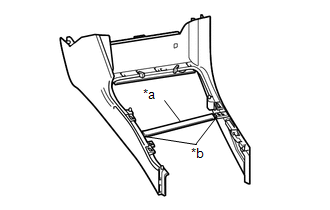
(b) Engage the 4 guides and 3 clips to install the front console box.
(c) Install the 2 screws.
(d) w/ Wireless Charger:
(1) Connect the connector.
3. INSTALL REAR CONSOLE BOX ASSEMBLY
(a) Engage the 4 guides and 2 claws to install the rear console box assembly.
(b) Engage the clamp and connect the connector.
(c) Install the 2 bolts.
4. INSTALL CONSOLE BOX CARPET
(a) Install the console box carpet.
5. INSTALL CONSOLE UPPER PANEL SUB-ASSEMBLY (for Automatic Transmission)
(a) Engage the 2 guides and 12 clips to install the console upper panel sub-assembly.
6. INSTALL CONSOLE UPPER PANEL SUB-ASSEMBLY (for Manual Transmission)
(a) Engage the 2 guides and 12 clips to install the console upper panel sub-assembly.
7. INSTALL SHIFT LEVER KNOB SUB-ASSEMBLY (for Automatic Transmission)
|
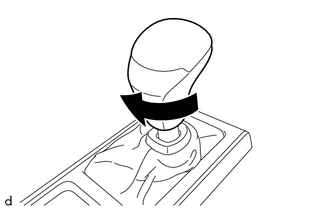
(a) Rotate the shift lever knob sub-assembly as shown in the illustration to install it. |
|
|
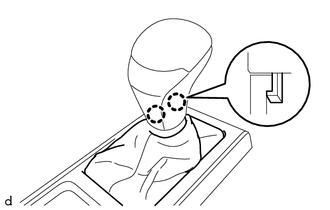
(b) Engage the 2 claws to install the shifting hole cover sub-assembly. |
|
8. INSTALL SHIFT LEVER KNOB SUB-ASSEMBLY (for Manual Transmission)
|
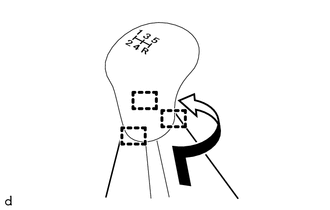
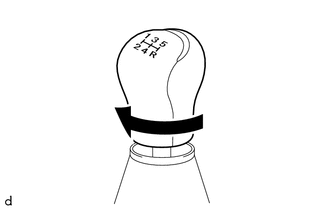
(a) Rotate the shift lever knob sub-assembly as shown in the illustration to install it. |
|
|
(b) Engage the 3 guides to install the shifting hole cover sub-assembly as shown in the illustration. |
|