Toyota Tacoma manuals

Toyota Tacoma (2015-2018) Service Manual: Inspection

INSPECTION

PROCEDURE

1. INSPECT WINDSHIELD WIPER MOTOR ASSEMBLY
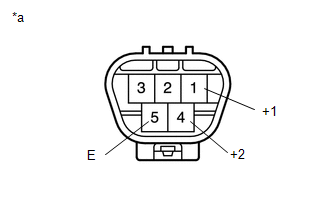
(a) Check the LO operation.

(a) Check the LO operation.

Text in Illustration

*a

Component without harness connected

(Windshield Wiper Motor Assembly)

(1) Apply battery voltage to the windshield wiper motor connector and check the speed of the windshield wiper motor assembly.

OK:

Measurement Condition

Specified Condition

Battery positive (+) → Terminal 1 (+1)

Battery negative (-) → Terminal 5 (E)

Motor operates at low speed

If the result is not as specified, replace the windshield wiper motor assembly.

(b) Check the HI operation.

(1) Apply battery voltage to the windshield wiper motor connector and check the speed of the windshield wiper motor assembly.

OK:

Measurement Condition

Specified Condition

Battery positive (+) → Terminal 4 (+2)

Battery negative (-) → Terminal 5 (E)

Motor operates at high speed

If the result is not as specified, replace the windshield wiper motor assembly.

On-vehicle Inspection
ON-VEHICLE INSPECTION PROCEDURE 1. INSPECT FRONT WIPER MOTOR (for Driver Side) Text in Illustration *a Matchmark (a) Check the stop (park) position. (b) Operate t ...

Installation
INSTALLATION PROCEDURE 1. INSTALL WINDSHIELD WIPER MOTOR ASSEMBLY (a) Apply MP grease to the crank arm pivot of the windshield wiper motor assembly. Text in Illustration ...

Other materials:

Diagnosis System
DIAGNOSIS SYSTEM 1. DESCRIPTION (a) Smart key system (for entry function) data and Diagnostic Trouble Codes (DTCs) can be read through the vehicle Data Link Connector 3 (DLC3). In some cases, a malfunction may be occurring in the smart key system. When the system seems to be malfunctioning, ...

Removal
REMOVAL PROCEDURE 1. REMOVE STEERING PAD (See page ) 2. REMOVE STEERING WHEEL ASSEMBLY 3. REMOVE LOWER STEERING COLUMN COVER 4. REMOVE UPPER STEERING COLUMN COVER 5. REMOVE SPIRAL CABLE SUB-ASSEMBLY WITH SENSOR (a) Slide the slider and disconnect the airbag connect ...

Portable Player cannot be Operated Using In-vehicle Device or Track Information is not Displayed on In-vehicle Device
PROCEDURE 1. CHECK USING ANOTHER "Bluetooth" AUDIO COMPATIBLE VEHICLE OF SAME MODEL (a) Check if track information is displayed normally on another "Bluetooth" audio compatible vehicle of the same model. OK: Track information is displayed no ...

© 2011-2025 Copyright www.ttguide.net