Components
COMPONENTS
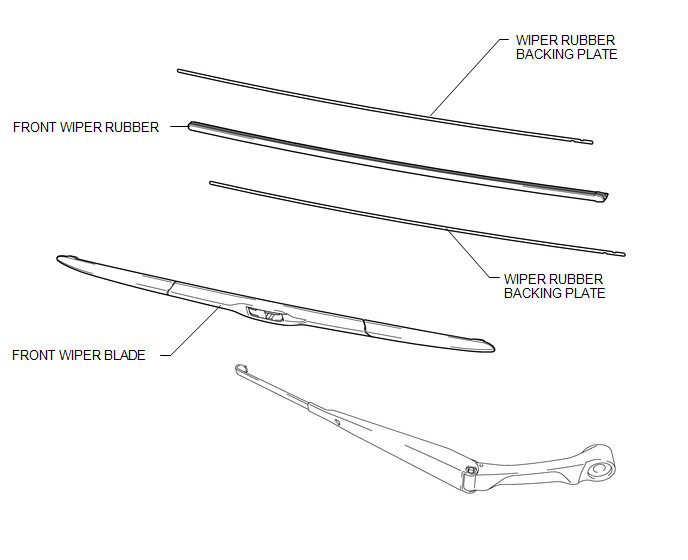
ILLUSTRATION
Installation
INSTALLATION
PROCEDURE
1. INSTALL FRONT WIPER RUBBER
|
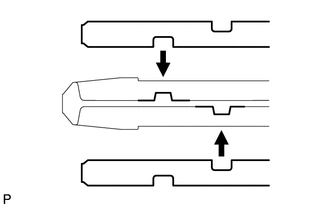
(a) Install the 2 wiper rubber backing plates to the front wiper rubber. NOTICE:
|
|
|
(b) Install the front wiper rubber together with the 2 front wiper rubber backing plates to the front wiper blade. NOTICE: Push the front wiper blade into the grooves of the wiper rubber to engage them completely. HINT: Install the wiper rubber LH so that the head part (large side) of the wiper rubber faces the arm axis side. |
|
2. INSTALL FRONT WIPER BLADE
|
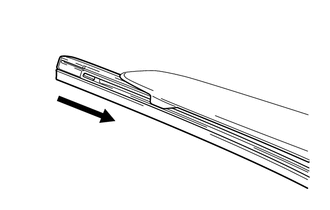
(a) Install the front wiper blade to the front wiper arm as shown in the illustration. Text in Illustration
|
|
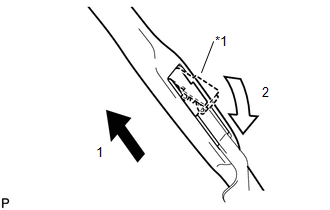
(b) Install the holder of the front wiper blade as shown in the illustration.
Removal
REMOVAL
CAUTION / NOTICE / HINT
NOTICE:
Make sure to hold the front wiper arm while lifting it as lifting the front wiper arm by the front wiper blade may damage or deform the front wiper blade
HINT:
- The following procedure is for the LH side.
- Use the same procedure for the RH side and LH side.
PROCEDURE
1. REMOVE FRONT WIPER BLADE
|
(a) Remove the holder of the front wiper blade as shown in the illustration. Text in Illustration
|
|
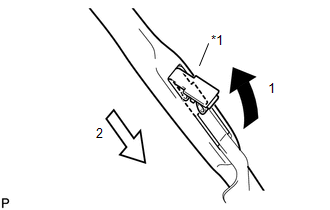
(b) Remove the front wiper blade from the front wiper arm as shown in the illustration.
NOTICE:
Do not lower the front wiper arm with the front wiper blade removed. The arm tip may damage the windshield surface.
2. REMOVE FRONT WIPER RUBBER
|
(a) Remove the front wiper rubber with wiper rubber backing plates from the front wiper blade. |
|
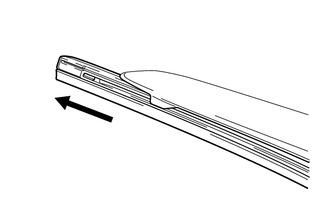
(b) Remove the 2 wiper rubber backing plates from the front wiper rubber.

