DESCRIPTION
DTC C1282 is stored only in test mode.
|
DTC Code |
DTC Detection Condition |
Trouble Area |
|---|---|---|
|
C1282 |
Stored during test mode. |
|
WIRING DIAGRAM
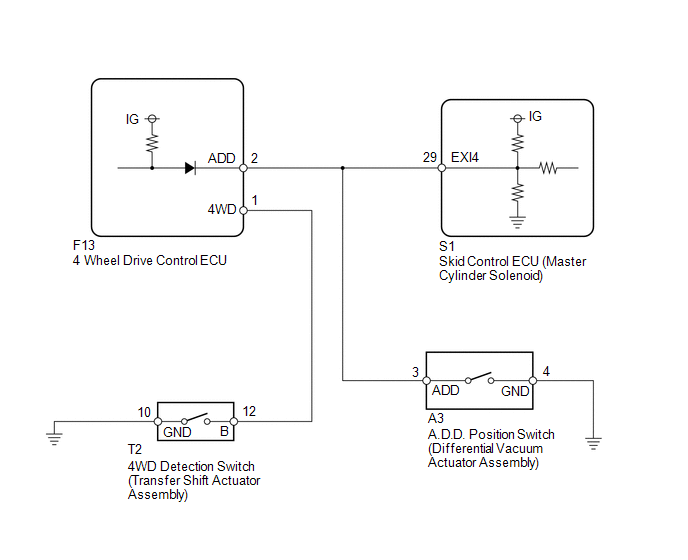
CAUTION / NOTICE / HINT
NOTICE:
When replacing the skid control ECU (master cylinder solenoid), perform calibration
(See page .gif) ).
).
PROCEDURE
|
1. |
INSPECT SKID CONTROL ECU (EXI4) |
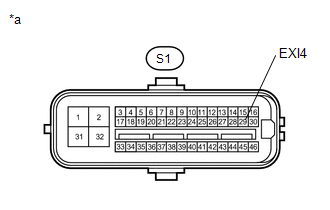
(a) Disconnect the S1 skid control ECU (master cylinder solenoid) connector.
|
(b) Measure the voltage according to the value(s) in the table below. Standard Voltage:
|
|
| NG | .gif) |
GO TO STEP 3 |
|
.gif)
|
2. |
CHECK TEST MODE DTC |
(a) Switch the vehicle to test mode, perform the 4WD detection switch signal
check, and then check that DTC C1282 is cleared (See page
).
|
Result |
Proceed to |
|---|---|
|
DTC is not cleared |
A |
|
DTC is cleared |
B |
| A | |
REPLACE MASTER CYLINDER SOLENOID |
| B | |
USE SIMULATION METHOD TO CHECK |
|
3. |
CHECK HARNESS AND CONNECTOR (SKID CONTROL ECU - 4 WHEEL DRIVE CONTROL ECU AND A.D.D. POSITION SWITCH) |
(a) Disconnect the S1 skid control ECU (master cylinder solenoid) connector.
(b) Disconnect the F13 4 wheel drive control ECU connector.
(c) Disconnect the A3 A.D.D. position switch (differential vacuum actuator assembly) connector.
(d) Measure the resistance according to the value(s) in the table below.
Standard Resistance:
|
Tester Connection |
Condition |
Specified Condition |
|---|---|---|
|
S1-29 (EXI4) - F13-2 (ADD) |
Always |
Below 1 Ω |
|
S1-29 (EXI4) - A3-3 (ADD) |
Always |
Below 1 Ω |
|
S1-29 (EXI4) - Body ground |
Always |
10 kΩ or higher |
| OK | |
GO TO TRANSFER SYSTEM (PROBLEM SYMPTOMS TABLE) |
| NG | |
REPAIR OR REPLACE HARNESS OR CONNECTOR |