
Toyota Tacoma (2015-2018) Service Manual: Voltage Inverter
Components
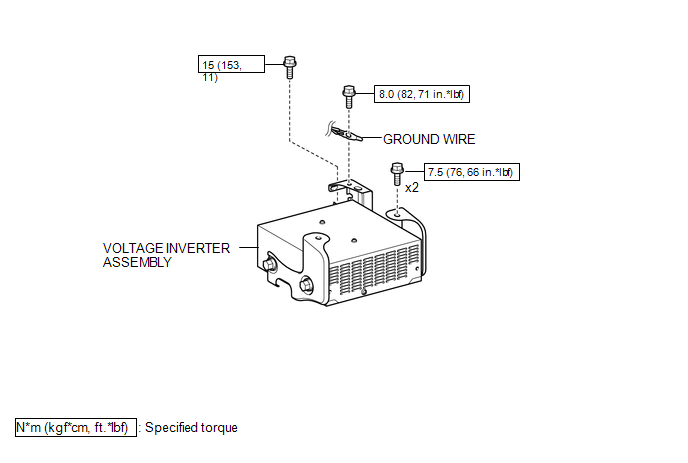
COMPONENTS
ILLUSTRATION
Inspection
INSPECTION
PROCEDURE
1. INSPECT VOLTAGE INVERTER ASSEMBLY
(a) Check the voltage inverter assembly.
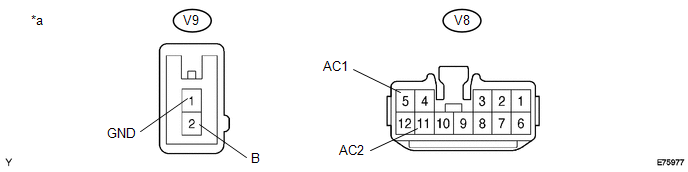
(1) Measure the voltage according to the value(s) in the table below.
 Text in Illustration
|
*a |
Component with harness connected (Voltage Inverter Assembly) |
- |
- |
Standard:
|
Tester Connection |
Switch Condition |
Specified Condition |
|---|---|---|
|
V9-2 (B) - V9-1 (GND) |
Ignition switch (ON) |
11 to 15 V |
|
V9-1 (GND) - Body ground |
Always |
Below 1 V |
|
V8-5 (AC1) - V8-11 (AC2) |
Ignition switch (ON) Main switch (ON) |
108 to 132 V |
If the result is not as specified, replace the voltage inverter assembly.
Removal
REMOVAL
PROCEDURE
1. REMOVE REAR CONSOLE BOX ASSEMBLY
(See page .gif) )
)
2. REMOVE VOLTAGE INVERTER ASSEMBLY
|
(a) Remove the bolt to disconnect the ground wire. |
|
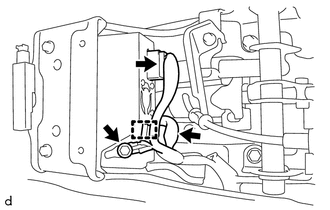
(b) Disconnect the 2 connectors and disengage the clamp.
|
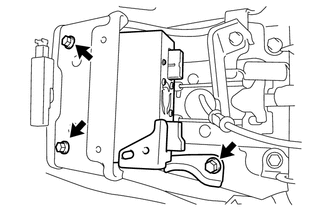
(c) Remove the 3 bolts and voltage inverter assembly. |
|
Installation
INSTALLATION
PROCEDURE
1. INSTALL VOLTAGE INVERTER ASSEMBLY
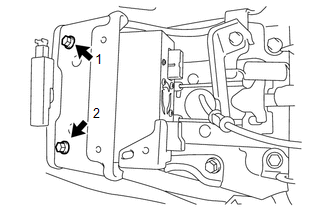
(a) Temporarily install the voltage inverter assembly with the 3 bolts.
|
(b) Tighten the 2 bolts in the order shown in the illustration. Torque: 7.5 N·m {76 kgf·cm, 66 in·lbf} |
|
|
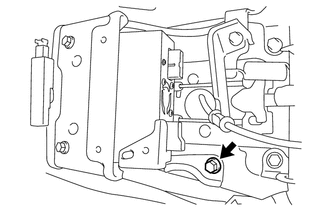
(c) Tighten the bolt. Torque: 15 N·m {153 kgf·cm, 11 ft·lbf} |
|
(d) Connect the 2 connectors and engage the clamp.
(e) Connect the ground wire with the bolt.
Torque:
8.0 N·m {82 kgf·cm, 71 in·lbf}
2. INSTALL REAR CONSOLE BOX ASSEMBLY
(See page .gif) )
)
 Rear Power Outlet Switch
Components
COMPONENTS
ILLUSTRATION
Inspection
INSPECTION
PROCEDURE
1. INSPECT MAIN SWITCH ASSEMBLY
(a) Check the main switch assembly.
(1) Measure the resistance according to ...
 Wireless Charger Assembly
Components
COMPONENTS
ILLUSTRATION
Removal
REMOVAL
PROCEDURE
1. REMOVE FRONT CONSOLE BOX
(See page
)
2. REMOVE MOBILE WIRELESS CHARGER CRADLE ASSEMBLY
(a) Remove the 5 sc ...
Other materials:
Active traction control system
The active traction control system automatically helps prevent the spinning of
4 wheels when the vehicle is started or accelerated on slippery road surfaces.
■ System operation
Vehicles with an automatic transmission:
Stop the vehicle, shift the shift lever to N and put the frontwheel d ...
System Diagram
SYSTEM DIAGRAM
Communication Table
Sender
Receiver
Signal
Communication Method
Power window regulator master switch assembly*1
Main Body ECU (Multiplex Network Body ECU)
Door control switch signal
...
Precaution
PRECAUTION
1. IGNITION SWITCH EXPRESSIONS
(a) The type of ignition switch used on this model differs according to the specifications
of the vehicle. The expressions listed in the table below are used in this section.
Expression
Ignition Switch (Position)
Engine ...
