REMOVAL
PROCEDURE
1. REMOVE MILLIMETER WAVE RADAR WIRE
|
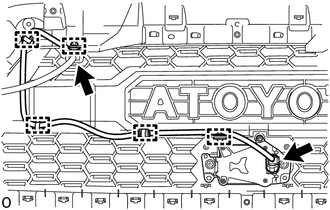
(a) for Type A: (1) Disconnect the 2 connectors. (2) Using a clip remover, disengage the 4 clamps to remove the millimeter wave radar wire. |
|
|
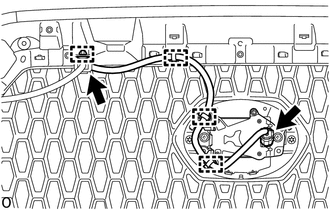
(b) for Type B: (1) Disconnect the 2 connectors. (2) Using a clip remover, disengage the 4 clamps to remove the millimeter wave radar wire. |
|
|
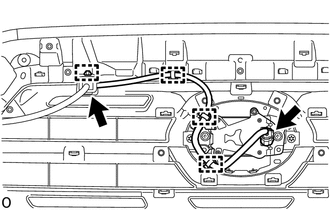
(c) for Type C: (1) Disconnect the 2 connectors. (2) Using a clip remover, disengage the 5 clamps to remove the millimeter wave radar wire. |
|
2. REMOVE MILLIMETER WAVE RADAR SENSOR ASSEMBLY
NOTICE:
Do not reuse the millimeter wave radar sensor assembly if it has been dropped or subjected to a severe impact.
|
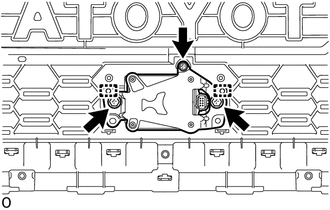
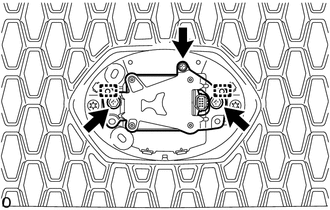
(a) for Type A: (1) Remove the 2 bolts and screw. (2) Disengage the 2 guides to remove the millimeter wave radar sensor assembly. |
|
|
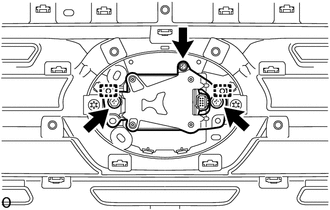
(b) for Type B: (1) Remove the 2 bolts and screw. (2) Disengage the 2 guides to remove the millimeter wave radar sensor assembly. |
|
|
(c) for Type C: (1) Remove the 2 bolts and screw. (2) Disengage the 2 guides to remove the millimeter wave radar sensor assembly. |
|