Toyota Tacoma manuals

Toyota Tacoma (2015-2018) Service Manual: Radio Antenna

Components

COMPONENTS

ILLUSTRATION
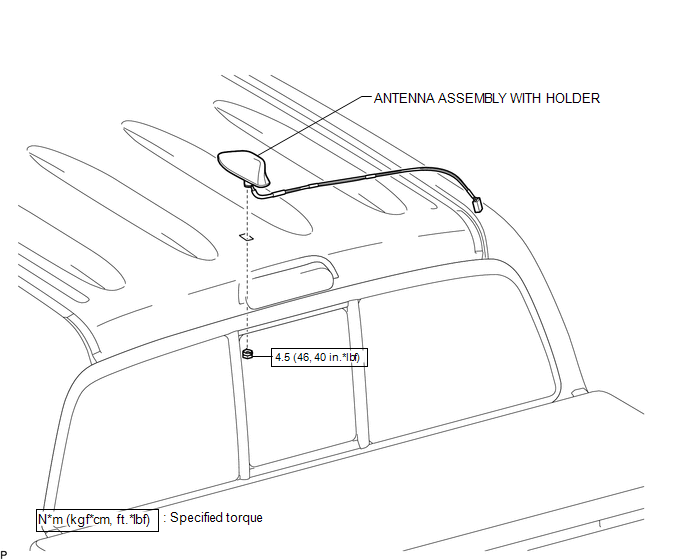
Removal

Removal

REMOVAL

PROCEDURE

1. REMOVE ROOF HEADLINING ASSEMBLY (for Double Cab)

(See page 2. REMOVE ROOF HEADLINING ASSEMBLY (for Access Cab) 2. REMOVE ROOF HEADLINING ASSEMBLY (for Access Cab) )

2. REMOVE ROOF HEADLINING ASSEMBLY (for Access Cab)

(See page 3. REMOVE ANTENNA ASSEMBLY WITH HOLDER 3. REMOVE ANTENNA ASSEMBLY WITH HOLDER )

3. REMOVE ANTENNA ASSEMBLY WITH HOLDER

(a) Disengage the 3 clamps.
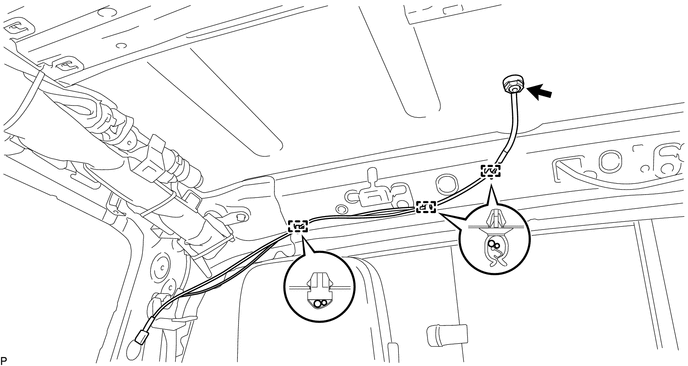
(b) Remove the nut.

(b) Remove the nut.

(c) Disengage the 2 claws to remove the antenna assembly with holder.

Installation

INSTALLATION

PROCEDURE

1. INSTALL ANTENNA ASSEMBLY WITH HOLDER

(a) Engage the 2 claws to install the antenna assembly with holder.

(b) Install the nut.

Torque:

4.5 N·m {46 kgf·cm, 40 in·lbf}

(c) Engage the 3 clamps.

2. INSTALL ROOF HEADLINING ASSEMBLY (for Double Cab)

(See page 3. INSTALL ROOF HEADLINING ASSEMBLY (for Access Cab) 3. INSTALL ROOF HEADLINING ASSEMBLY (for Access Cab) )

3. INSTALL ROOF HEADLINING ASSEMBLY (for Access Cab)

(See page Radio Antenna Cord Radio Antenna Cord )

Noise Filter(for 2tr-fe)
Components COMPONENTS ILLUSTRATION Removal REMOVAL PROCEDURE 1. DISCONNECT CABLE FROM NEGATIVE BATTERY TERMINAL 2. REMOVE AIR CLEANER ASSEMBLY (See page ) 3. REMOVE RADIO SETTING COND ...

Radio Antenna Cord
Components COMPONENTS ILLUSTRATION Removal REMOVAL PROCEDURE 1. REMOVE INSTRUMENT PANEL SUB-ASSEMBLY (See page ) 2. REMOVE ANTENNA CORD SUB-ASSEMBLY (a) Disengage the 4 clamps to remo ...

Other materials:

Removal
REMOVAL PROCEDURE 1. REMOVE MANUAL TRANSMISSION ASSEMBLY (See page ) 2. REMOVE CLUTCH RELEASE FORK SUB-ASSEMBLY (a) Remove the clutch release fork sub-assembly with the clutch release bearing assembly from the manual transmission assembly. ...

Steering Angle Sensor (C1A47)
DESCRIPTION The forward recognition camera receives steering angle information from the spiral cable with sensor sub-assembly. If the forward recognition camera detects a spiral cable with sensor sub-assembly, DTC C1A47 is stored. DTC No. Detection Item DTC Det ...

Cellular Phone Registration Failure, Phone Directory Transfer Failure
PROCEDURE 1. CHECK OPERATION (a) Place the cellular phone close to the navigation receiver assembly. (b) Check if the cellular phone can be registered. OK: The cellular phone can be registered. OK NORMAL OPERATION ...

© 2011-2025 Copyright www.ttguide.net