INSTALLATION
PROCEDURE
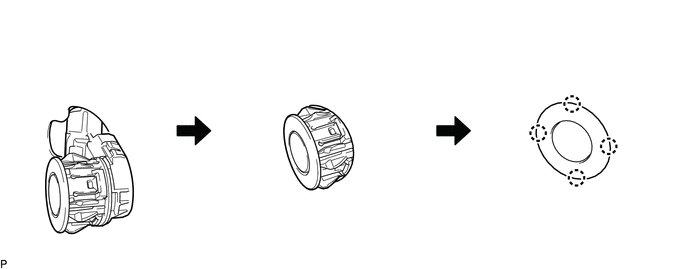
1. INSTALL NO. 1 ULTRASONIC SENSOR
HINT:
Use the same procedure for both sides.
(a) Engage the 4 claws to install the 4 No. 1 ultrasonic sensors as shown in the illustration.
2. INSTALL REAR BUMPER EXTENSION LH (w/ Towing Package)
(See page .gif) )
)
3. INSTALL REAR BUMPER EXTENSION LH (w/o Towing Package)
(See page )
4. INSTALL REAR BUMPER EXTENSION RH (w/ Towing Package)
HINT:
Use the same procedure as for the LH side.
5. INSTALL REAR BUMPER EXTENSION RH (w/o Towing Package)
HINT:
Use the same procedure as for the LH side.
6. INSTALL REAR BUMPER PAD SUB-ASSEMBLY (w/ Towing Package)
(See page )
7. INSTALL REAR BUMPER PAD SUB-ASSEMBLY (w/o Towing Package)
(See page )
8. INSTALL CONNECTOR COVER (w/ Towing Package)
(See page )
9. INSTALL REAR BUMPER HOLE COVER (w/o Towing Package)
(See page )
10. INSTALL REAR BUMPER ASSEMBLY (w/ Towing Package)
(See page )
11. INSTALL REAR BUMPER ASSEMBLY (w/o Towing Package)
(See page )

