INSTALLATION
PROCEDURE
1. INSTALL CENTER STOP LIGHT ASSEMBLY (for Bulb Type Stop Light)
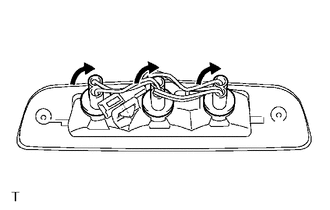
(a) Install the 3 center stop light bulbs to the 3 center stop light sockets.
|
(b) Turn the 3 center stop light sockets with 3 center stop light bulbs in the direction indicated by the arrow shown in the illustration to install them. |
|
(c) Connect the connector.
(d) Install the center stop light assembly with the 2 screws.
(e) Remove the protective tape.
2. INSTALL CENTER STOP LIGHT ASSEMBLY (for LED Type Stop Light)
(a) Connect the connector.
|
(b) Engage the 2 clips to install the center stop light assembly. |
|
(c) Install the 2 nuts.
Torque:
3.6 N·m {36 kgf·cm, 31 in·lbf}
(d) Remove the protective tape.
3. CONNECT ROOF HEADLINING ASSEMBLY (for LED Type Stop Light)
(See page
)
(See page
)
Removal
Interior Illumination LightData Signal Circuit between Stereo Jack Adapter and Extension Module
DESCRIPTION
The No. 1 stereo jack adapter assembly sends the sound data signal or image data
signal from a USB device to the navigation receiver assembly via this circuit.
WIRING DIAGRAM
PROCEDURE
1.
CHECK HARNESS AND CONNECTOR (NAVIGATION RECEIVER ASSEMBLY - NO. 1 STE ...
High Beam Headlight Circuit
DESCRIPTION
The main body ECU (multiplex network body ECU) controls the high beam headlights.
WIRING DIAGRAM
CAUTION / NOTICE / HINT
NOTICE:
Inspect the fuses for circuits related to this system before performing
the following inspection procedure.
If the main body ECU (multip ...
Dtc Check / Clear
DTC CHECK / CLEAR
1. CHECK DTC
(a) Connect the Techstream to the DLC3.
(b) Turn the ignition switch to ON.
(c) Turn the Techstream on.
(d) Enter the following menus: Body Electrical / Air Conditioner / Trouble Codes.
(e) Check for DTCs.
2. CLEAR DTC
(a) Connect the Techstream to the DLC3.
( ...