DISASSEMBLY
PROCEDURE
1. REMOVE NO. 1 HEATER TO REGISTER DUCT
|
(a) Remove the 2 screws <F> and screw <D>. |
|
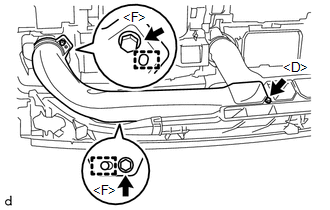
(b) Disengage the 2 guides to remove the No. 1 heater to register duct.
2. REMOVE NO. 3 HEATER TO REGISTER DUCT
|
(a) Remove the 2 screws <F> and screw <D>. |
|
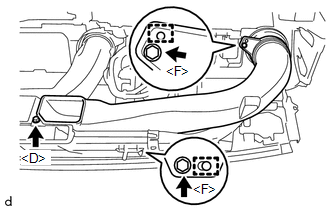
(b) Disengage the 2 guides to remove the No. 3 heater to register duct.
3. REMOVE NO. 2 HEATER TO REGISTER DUCT
|
(a) Remove the 2 screws <F> and screw <D>. |
|
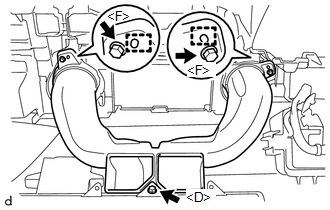
(b) Disengage the 2 guides to remove the No. 2 heater to register duct.
4. REMOVE SIDE NO. 1 DEFROSTER NOZZLE DUCT
|
(a) Remove the 2 screws <F>. |
|
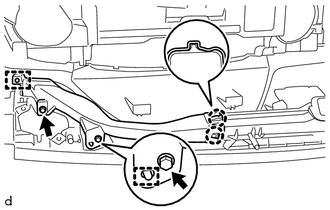
(b) Disengage the 2 guides.
(c) Disengage the 2 claws to remove the side No. 1 defroster nozzle duct.
5. REMOVE SIDE NO. 2 DEFROSTER NOZZLE DUCT
|
(a) Remove the 2 screws <F>. |
|
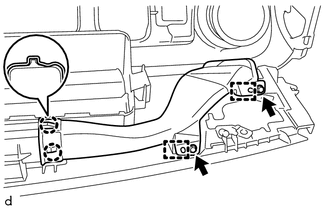
(b) Disengage the 2 guides.
(c) Disengage the 2 claws to remove the side No. 2 defroster nozzle duct.
6. REMOVE DEFROSTER NOZZLE ASSEMBLY
|
(a) Remove the 3 screws <F>. |
|
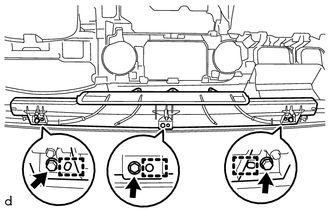
(b) Disengage the 3 guides to remove the defroster nozzle assembly.
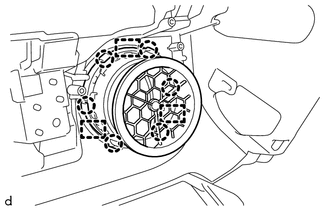
7. REMOVE NO. 1 INSTRUMENT PANEL REGISTER SUB-ASSEMBLY
|
(a) Disengage the 6 claws and 3 guides to remove the No. 1 instrument panel register sub-assembly. |
|
8. REMOVE NETWORK GATEWAY ECU
.gif)
9. REMOVE NAVIGATION ANTENNA ASSEMBLY (w/ Navigation System)
10. REMOVE ANTENNA CORD SUB-ASSEMBLY
11. REMOVE INSTRUMENT PANEL PASSENGER WITHOUT DOOR AIRBAG ASSEMBLY
12. REMOVE NO. 1 INSTRUMENT PANEL PIN
HINT:
Use the same procedure as for the opposite side.
|
(a) Remove the screw <F>. |
|
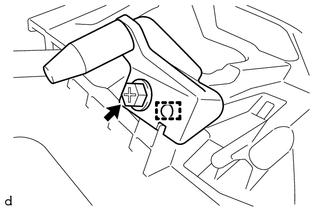
(b) Disengage the guide to remove the No. 1 instrument panel pin.
13. REMOVE NO. 1 METER HOOD RETAINER
HINT:
Use the same procedure as for the opposite side.
|
(a) Remove the screw <D>. |
|
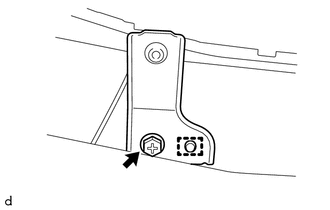
(b) Disengage the guide to remove the No. 1 meter hood retainer.
14. REMOVE NO. 1 INSTRUMENT PANEL CUSHION
|
(a) Remove the No. 1 instrument panel cushion. |
|
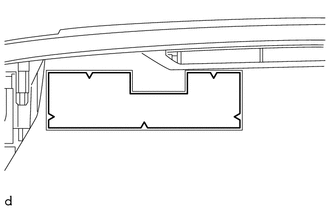
15. REMOVE NO. 2 INSTRUMENT PANEL CUSHION
|
(a) Remove the No. 2 instrument panel cushion. |
|
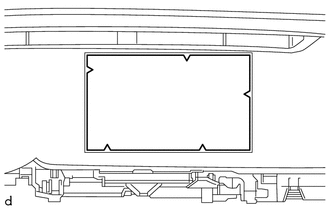
16. REMOVE NO. 4 INSTRUMENT PANEL CUSHION
|
(a) Remove the No. 4 instrument panel cushion. |
|
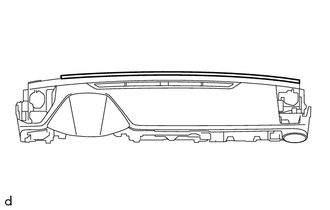
17. REMOVE INSTRUMENT PANEL CUSHION
|
(a) Remove the instrument panel cushion. |
|