Adjustment
ADJUSTMENT
PROCEDURE
1. INSPECT DIFFERENTIAL OIL
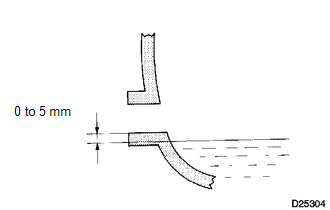
(a) Stop the vehicle on a level place.
(b) Remove the differential filler plug and gasket.
(c) Check that the oil level is within 5 mm (0 to 0.20 in.) of the bottom of the filler plug opening.
NOTICE:
- Excessively large or small quantities of oil may cause problems.
- After replacing the oil, drive the vehicle and check the oil level again.
HINT:
If necessary, fill the differential carrier assembly with differential gear oil.
Oil type and viscosity:
Toyota Genuine Differential gear oil LT SAE 75W-85 APL GL-5 or equivalent.
Capacity:
Front differential carrier assembly:
1.45 to 1.55 liters
(1.54 to 1.64 US qts, 1.28 to 1.36 Imp. qts)
Rear differential carrier assembly (for BD20D (EX Long Wheelbase )):
2.85 to 2.95 liters
(3.01 to 3.12 US qts, 2.51 to 2.60 Imp. qts)
Rear differential carrier assembly (for BD20D (SP Long Wheelbase)):
3.00 to 3.10 liters
(3.17 to 3.28 US qts, 2.64 to 2.73 Imp. qts)
Rear differential carrier assembly (for BD22A (EX Long Wheelbase)):
3.75 to 3.85 liters
(3.96 to 4.07 US qts, 3.30 to 3.39 Imp. qts)
Rear differential carrier assembly (for BD22AN (EX Long Wheelbase)):
3.75 to 3.85 liters
(3.96 to 4.07 US qts, 3.30 to 3.39 Imp. qts)
Rear differential carrier assembly (for BD22AN (SP Long Wheelbase)):
3.95 to 4.05 liters
(4.17 to 4.28 US qts, 3.48 to 3.56 Imp. qts)
(d) Check for oil leakage if the oil level is low.
(e) Install the differential filler plug and a new gasket.
Torque:
Front differential carrier assembly :
39 N·m {398 kgf·cm, 29 ft·lbf}
Rear differential carrier assembly :
49 N·m {500 kgf·cm, 36 ft·lbf}