Toyota Tacoma manuals

Toyota Tacoma (2015-2018) Service Manual: Unlock Warning Switch

Components

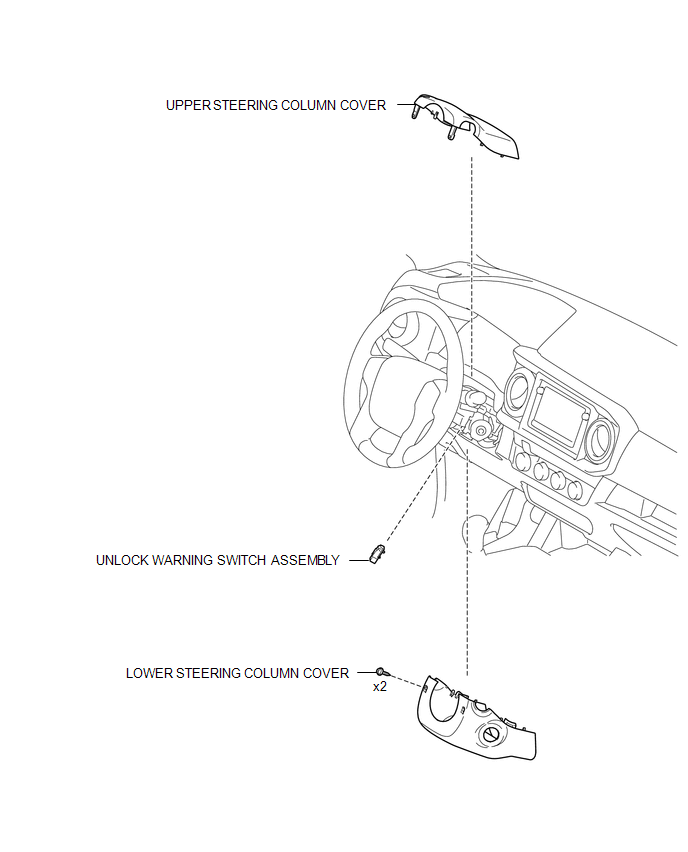
COMPONENTS

ILLUSTRATION
Inspection

Inspection

INSPECTION

PROCEDURE

1. INSPECT UNLOCK WARNING SWITCH ASSEMBLY

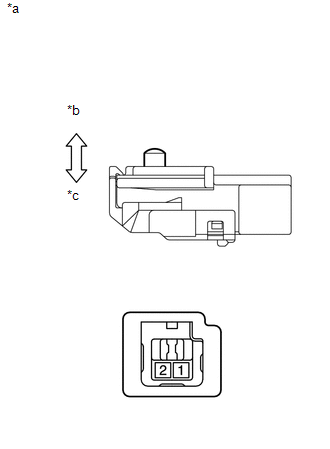
(a) Check the resistance.

(1) Measure the resistance according to the value(s) in the table below.

Text in Illustration

*a

Component without harness connected

(Unlock Warning Switch Assembly)

*b

Not Pushed

*c

Pushed

Standard Resistance:

Tester Connection

Switch Condition

Specified Condition

1 - 2

Pushed

Below 1 Ω

1 - 2

Not Pushed

10 kΩ or higher

  • If the result is not as specified, replace the unlock warning switch assembly.

Removal

REMOVAL

PROCEDURE

1. REMOVE LOWER STEERING COLUMN COVER

2. REMOVE UPPER STEERING COLUMN COVER 2. REMOVE UPPER STEERING COLUMN COVER

2. REMOVE UPPER STEERING COLUMN COVER

3. REMOVE UNLOCK WARNING SWITCH ASSEMBLY 3. REMOVE UNLOCK WARNING SWITCH ASSEMBLY

3. REMOVE UNLOCK WARNING SWITCH ASSEMBLY

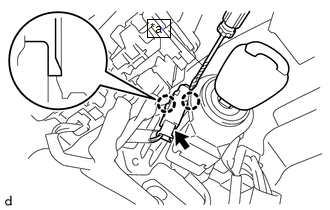
(a) Insert the key into the ignition key cylinder.

Text in Illustration

*a

Protective Tape

(b) Disconnect the connector.

(c) Using a screwdriver with its tip wrapped in protective tape, disengage the 2 claws to remove the unlock warning switch assembly.

Installation

INSTALLATION

PROCEDURE

1. INSTALL UNLOCK WARNING SWITCH ASSEMBLY

(a) Engage the 2 claws to install the unlock warning switch assembly.

(b) Connect the connector.

(c) Remove the key from the ignition key cylinder.

2. INSTALL UPPER STEERING COLUMN COVER

3. INSTALL LOWER STEERING COLUMN COVER 3. INSTALL LOWER STEERING COLUMN COVER

3. INSTALL LOWER STEERING COLUMN COVER

Wireless Door Lock Buzzer Wireless Door Lock Buzzer

Transmitter Battery(w/ Smart Key System)
Replacement REPLACEMENT CAUTION / NOTICE / HINT NOTICE: Take extra care when handling these precision electronic components. PROCEDURE 1. REMOVE TRANSMITTER BATTERY (a) Push the re ...

Wireless Door Lock Buzzer
Components COMPONENTS ILLUSTRATION Removal REMOVAL PROCEDURE 1. REMOVE WIRELESS DOOR LOCK BUZZER (a) Disconnect the connector. (b) Us ...

Other materials:

Terminals Of Ecu
TERMINALS OF ECU 1. TERMINAL INSPECTION Text in Illustration *a Component without harness connected (Steering Lock ECU (Steering Lock Actuator or UPR Bracket Assembly)) - - (a) Measure the voltage and resistance according to the value(s) i ...

Dtc Check / Clear
DTC CHECK / CLEAR 1. DTC CHECK/CLEAR (When Using Techstream) (a) Check the DTC. (1) Turn the ignition switch off. (2) Connect the Techstream to the DLC3. (3) Turn the ignition switch to ON. (4) Turn the Techstream on. (5) Read the DTCs following the prompts on the Techstream screen. Enter the ...

How To Proceed With Troubleshooting
CAUTION / NOTICE / HINT HINT: The wireless door lock control system troubleshooting procedures are based on the premise that the power door lock control system is operating normally. Check the power door lock control system first before troubleshooting the wireless door lock co ...

© 2011-2026 Copyright www.ttguide.net