Toyota Tacoma manuals

Toyota Tacoma (2015-2018) Service Manual: Crankshaft Position Sensor

Components

COMPONENTS

ILLUSTRATION
Installation

Installation

INSTALLATION

PROCEDURE

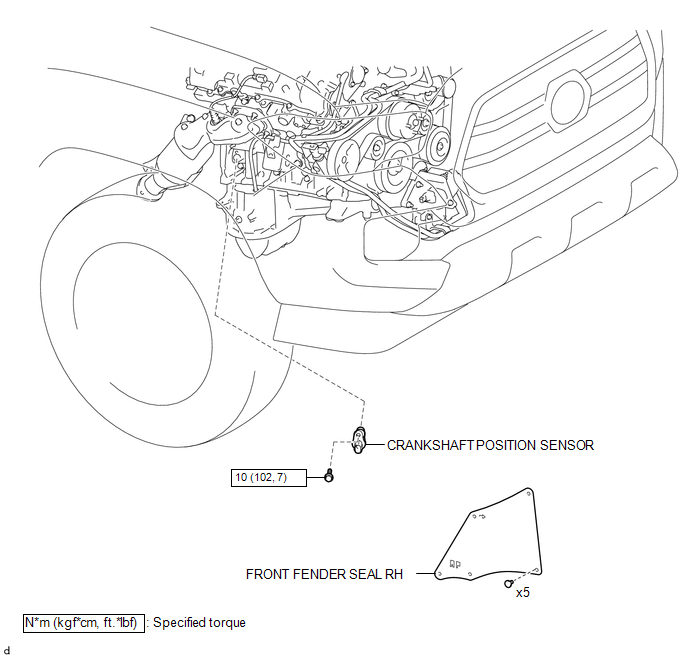
1. INSTALL CRANKSHAFT POSITION SENSOR

(a) Apply a light coat of engine oil to the O-ring of the crankshaft position sensor.

NOTICE:

  • When reusing the crankshaft position sensor, inspect the O-ring.
  • If the O-ring has scratches or cuts, replace the crankshaft position sensor.

(b) Install the crankshaft position sensor to the cylinder block sub-assembly with the bolt.

Torque:

10 N·m {102 kgf·cm, 7 ft·lbf}

(c) Connect the connector to the crankshaft position sensor.

2. INSTALL FRONT FENDER SEAL RH

HINT:

Use the same procedure as for the LH side (See page Removal ).

Removal

REMOVAL

PROCEDURE

1. REMOVE FRONT FENDER SEAL RH

HINT:

Use the same procedure as for the LH side (See page 2. REMOVE CRANKSHAFT POSITION SENSOR ).

2. REMOVE CRANKSHAFT POSITION SENSOR

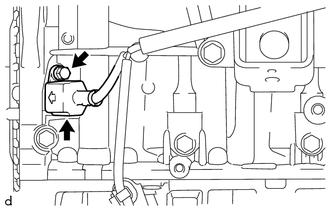
(a) Disconnect the connector from the crankshaft position sensor.

(b) Remove the bolt and crankshaft position sensor from the cylinder block sub-assembly.

Installation
INSTALLATION PROCEDURE 1. SET NO. 1 CYLINDER TO TDC/COMPRESSION 2. INSTALL CAMSHAFT TIMING GEAR BOLT NOTICE: There are different types of camshaft timing gearbolts. Make sure to check the id ...

Ecm
Components COMPONENTS ILLUSTRATION ILLUSTRATION Installation INSTALLATION PROCEDURE 1. INSTALL NO. 2 ECM BRACKET (a) Install the No. 2 ECM bracket to the ECM with the 2 screws. Torque ...

Other materials:

Tail Gate Protector
Components COMPONENTS ILLUSTRATION Removal REMOVAL PROCEDURE 1. REMOVE TAIL GATE PROTECTOR (a) Using a T30 "TORX" socket wrench, remove the 8 screws. (b) Disengage the 14 claws and 3 guides to remove the tail gate protector ...

Lost Communication with Meter (B1324)
DESCRIPTION This DTC is stored when a communication error occurs between the radio and display receiver assembly and combination meter assembly. DTC No. DTC Detection Condition Trouble Area B1324 After the radio and display receiver as ...

Data List / Active Test
DATA LIST / ACTIVE TEST 1. DATA LIST HINT: Using the Techstream to read the Data List allows the values or states of switches, sensors, actuators and other items to be read without removing any parts. This non-intrusive inspection can be very useful because intermittent conditions or signals ...

© 2011-2026 Copyright www.ttguide.net