Toyota Tacoma manuals

Toyota Tacoma (2015-2018) Service Manual: Cargo Light

Components

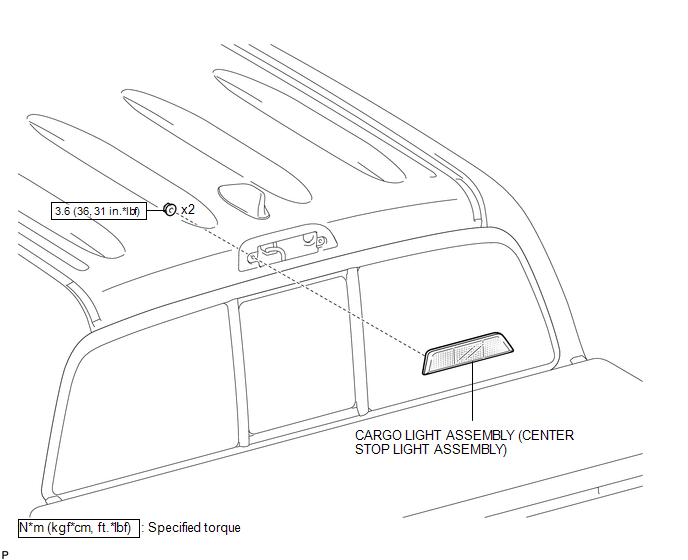
COMPONENTS

ILLUSTRATION
Removal

Removal

REMOVAL

PROCEDURE

1. REMOVE ROOF HEADLINING ASSEMBLY

  • for Double Cab:

    (See page ) )

  • for Access Cab:

    (See page ) )

2. REMOVE CARGO LIGHT ASSEMBLY (CENTER STOP LIGHT ASSEMBLY)

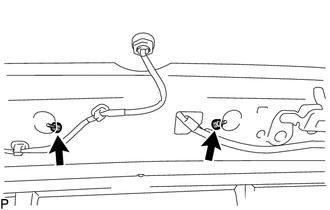
(a) Remove the 2 nuts.

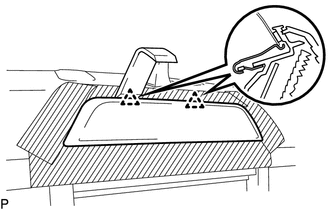
(b) Apply protective tape around the cargo light assembly (center stop light assembly).
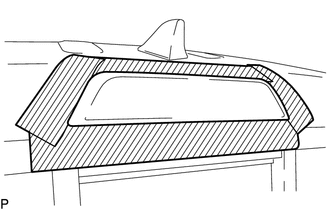
Text in Illustration

Protective Tape

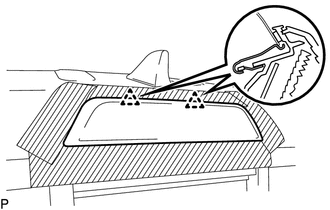
(c) Using a moulding remover D, disengage the 2 clips to separate the cargo light assembly (center stop light assembly).

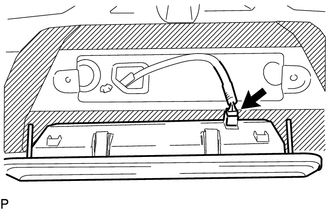
(d) Disconnect the connector to remove the cargo light assembly (center stop light assembly).

Inspection

INSPECTION

PROCEDURE

1. INSPECT CARGO LIGHT ASSEMBLY (CENTER STOP LIGHT ASSEMBLY)

(a) Check the illuminates.

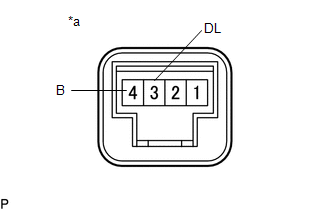
(1) Apply battery voltage to the connector and check the light illumination condition.

Text in Illustration

*a

Component without harness connected

(Cargo Light Assembly (Center Stop Light Assembly))

OK:

Measurement Condition

Specified Condition

Battery positive (+) → 3 (DL)

Battery negative (-) → 1 (E)

Cargo light illuminates

If the result is not as specified, replace the cargo light assembly (center stop light assembly).

Installation

INSTALLATION

PROCEDURE

1. INSTALL CARGO LIGHT ASSEMBLY (CENTER STOP LIGHT ASSEMBLY)

(a) Connect the connector.

(b) Engage the 2 clips to install the cargo light assembly (center stop light assembly).

(c) Install the 2 nuts.

Torque:

3.6 N·m {36 kgf·cm, 31 in·lbf}

(d) Remove the protective tape.

2. INSPECT ROOF HEADLINING ASSEMBLY

  • for Double Cab:

    (See page ) )

  • for Access Cab:

    (See page ) )

Automatic Light Control Sensor
Components COMPONENTS ILLUSTRATION Installation INSTALLATION PROCEDURE 1. INSTALL AUTOMATIC LIGHT CONTROL SENSOR (a) Engage the 2 claws to install the automatic light control sensor. 2. ...

Cargo Light Switch
Components COMPONENTS ILLUSTRATION Inspection INSPECTION PROCEDURE 1. INSPECT DECK LIGHT SWITCH ASSEMBLY (a) Check the resistance. (1) Measure the resistance according to the ...

Other materials:

Problem Symptoms Table
PROBLEM SYMPTOMS TABLE HINT: Use the table below to help determine the cause of problem symptoms. If multiple suspected areas are listed, the potential causes of the symptoms are listed in order of probability in the "Suspected Area" column of the table. Check each sy ...

Diagnostic Trouble Code Chart
DIAGNOSTIC TROUBLE CODE CHART HINT: If a trouble code is displayed during the DTC check, inspect the trouble area for that code. For details of each code, refer to the relevant page listed under respective "See page" in the DTC chart. Tire Pressure Warning ECU and Receiver ...

Clutch start cancel switch
The switch allows the vehicle to be driven out of difficult situations by cranking the engine with the clutch engaged. Never use the switch for normal engine starting. Be sure to follow the starting procedure. Press the CLUTCH START CANCEL switch to cancel the clutch start system when the ...

© 2011-2026 Copyright www.ttguide.net