Toyota Tacoma manuals

Toyota Tacoma (2015-2018) Service Manual: Air Outlet Control Servo Motor

Inspection

INSPECTION

PROCEDURE

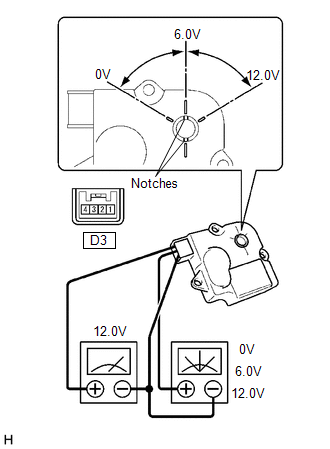
1. INSPECT MODE CONTROL SERVO MOTOR

(a) Inspect the servo motor operation.

(1) When 12V is applied between terminals 4 (IGN) and 1 (GND), and 0V is applied between terminals 2 (SIG) and 1 (GND), check that the line connecting the 2 notches moves to the 0V position.

If the result is not as specified, replace the mode control servo motor.

(2) When 12V is applied between terminals 4 (IGN) and 1 (GND), and 6V is applied between terminals 2 (SIG) and 1 (GND), check that the line connecting the 2 notches moves to the 6V position.

If the result is not as specified, replace the mode control servo motor.

(3) When 12V is applied between terminals 4 (IGN) and 1 (GND), and between terminals 2 (SIG) and 1 (GND), check that the line connecting the 2 notches moves to the 12V position.

If the result is not as specified, replace the mode control servo motor.

Air Mix Control Servo Motor
Inspection INSPECTION PROCEDURE 1. INSPECT AIR MIX CONTROL SERVO MOTOR (for Manual Air Conditioning System) (a) Inspect the servo motor operation. Text in Illustration ...

Ambient Temperature Sensor
Components COMPONENTS ILLUSTRATION Inspection INSPECTION PROCEDURE 1. INSPECT AMBIENT TEMPERATURE SENSOR (a) Measure the resistance according to the value(s) in the table below ...

Other materials:

Dtc Check / Clear
DTC CHECK / CLEAR NOTICE: When using the Techstream with the engine switch off, connect the Techstream to the DLC3 and turn a courtesy light switch on and off at intervals of 1.5 seconds or less until communication between the Techstream and the vehicle begins. Then select the vehicle type u ...

Terminals Of Ecu
TERMINALS OF ECU 1. CHECK TIRE PRESSURE WARNING ECU AND RECEIVER (a) Disconnect the T14 tire pressure warning ECU and receiver connector and measure the voltage and resistance on the wire harness side. Text in Illustration *A w/o Wireless Door Lock System ...

Touch Panel Switch does not Function
PROCEDURE 1. CHECK MULTI-DISPLAY (a) Check if there is any foreign matter caught between the display and exterior frame of the multi-display. OK: No foreign matter is caught between the display and exterior frame of the multi-display. HINT: If there is foreig ...

В© 2011-2025 Copyright www.ttguide.net