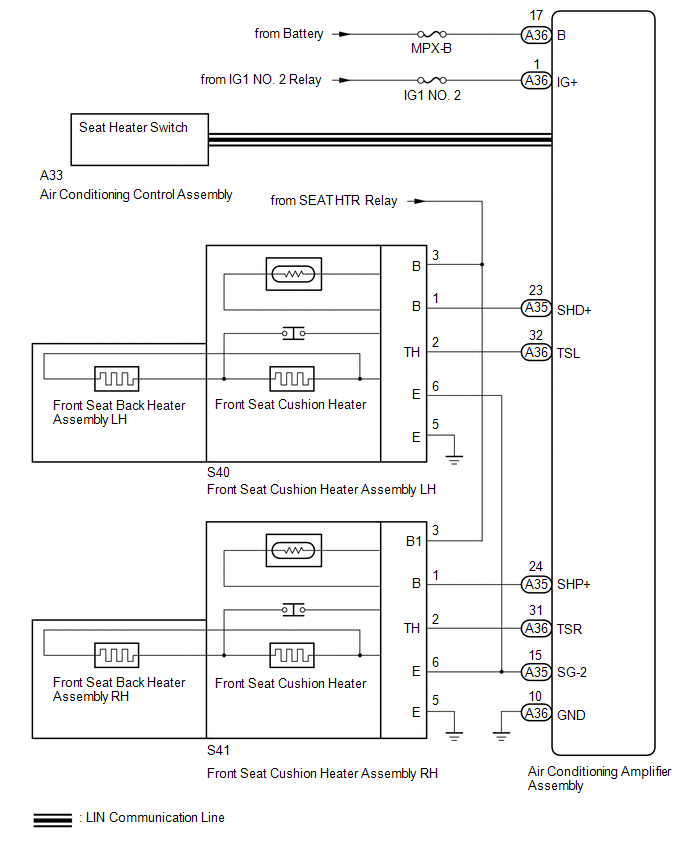
SYSTEM DIAGRAM
Related Tacoma materials
Refueling
Opening the fuel tank cap
Perform the following steps to open the fuel tank cap.
■ Before refueling the vehicle
Turn the engine switch off and ensure that all the doors and windows are closed.
■ Opening the fuel tank cap
Open the fuel filler door.
...
Microphone Circuit between Microphone and Radio Receiver
DESCRIPTION
The navigation receiver assembly and telephone microphone assembly are connected
to each other using the microphone connection detection signal lines.
Using this circuit, the navigation receiver assembly sends power to the telephone
microphone assembly and the telephone microphone ...
Parts Location
PARTS LOCATION
ILLUSTRATION
*1
FUEL TANK CAP ASSEMBLY
*2
CHARCOAL CANISTER ASSEMBLY
...