INSPECTION
PROCEDURE
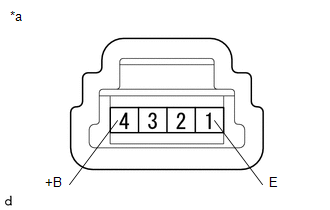
1. INSPECT AUTO HIGH BEAM SWITCH
|
*a |
Component without harness connected (Auto High Beam Switch) |
(a) Check the resistance.
(1) Measure the resistance according to the value(s) in the table below.
Standard Resistance:
|
Tester Connection |
Switch Condition |
Specified Condition |
|---|---|---|
| If the result is not as specified, replace the auto high beam switch. | ||
|
4 (+B) - 1 (E) |
Auto high beam switch ON |
Below 1 Ω |
|
Auto high beam switch OFF |
10 kΩ or higher |
|
|
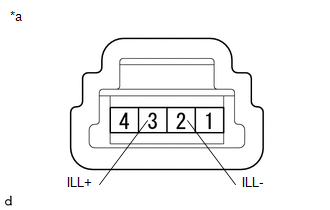
(b) Check the illumination. (1) Apply battery voltage to the connector and check the illumination condition. OK:
|
|
||||||||||
Components
RemovalBlack Screen
PROCEDURE
1.
CHECK DISPLAY SETTING
(a) Check that the display is not in "Screen Off" mode.
OK:
The display setting is not in "Screen Off" mode.
NG
CHANGE SCREEN TO SCREEN ON MODE
OK
...
Wireless Charger Power Source Circuit
DESCRIPTION
This is the power source circuit to operate the mobile wireless charger cradle
assembly.
WIRING DIAGRAM
CAUTION / NOTICE / HINT
NOTICE:
Inspect the fuses for circuits related to this system before performing the following
inspection procedure.
PROCEDURE
1.
...
Installation
INSTALLATION
CAUTION / NOTICE / HINT
HINT:
Use the same procedure for the RH side and LH side.
The procedure listed below is for the LH side.
PROCEDURE
1. INSTALL FRONT COIL SPRING
(a) Install SST to the front coil spring, and secure SST in a vise.
SST: 09727-00 ...