Components
COMPONENTS
ILLUSTRATION
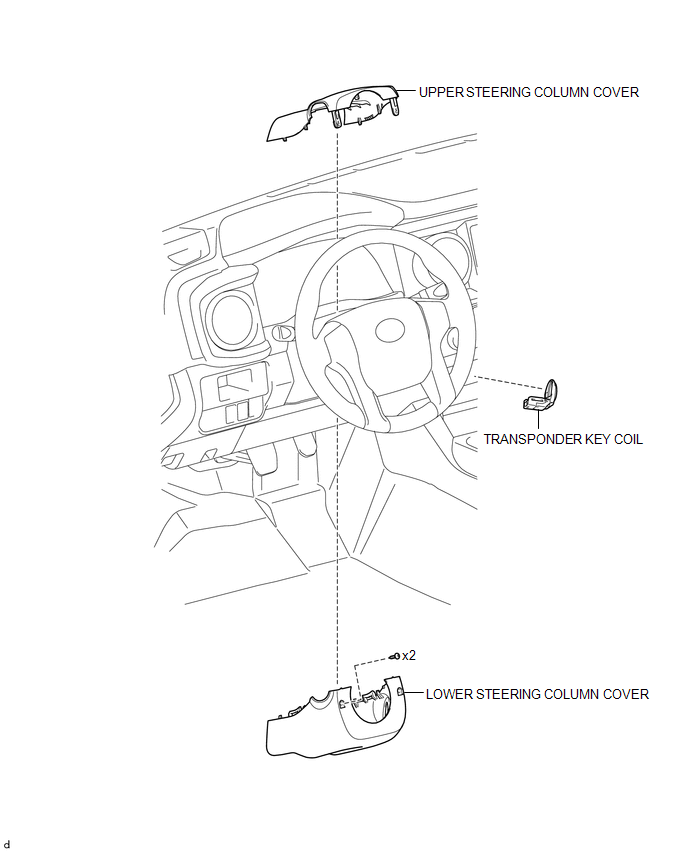
Installation
INSTALLATION
PROCEDURE
1. INSTALL TRANSPONDER KEY COIL
|
(a) Engage the 2 claws to install the transponder key coil. |
|
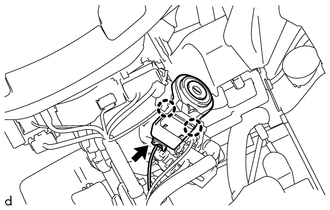
(b) Connect the connector.
2. INSTALL UPPER STEERING COLUMN COVER
(See page
)
3. INSTALL LOWER STEERING COLUMN COVER
(See page
)
Removal
REMOVAL
PROCEDURE
1. REMOVE LOWER STEERING COLUMN COVER
(See page
)
2. REMOVE UPPER STEERING COLUMN COVER
(See page
)
3. REMOVE TRANSPONDER KEY COIL
|
(a) Disconnect the connector. |
|
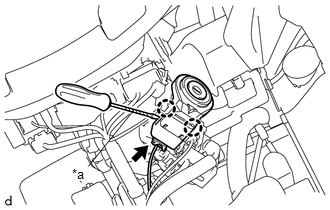
(b) Using a screwdriver with its tip wrapped in protective tape, disengage the 2 claws to remove the transponder key coil.
Text in Illustration|
*a |
Protective Tape |
Security Indicator Light Does not Blink
Transponder Key EcuRoom Light Assembly
Components
COMPONENTS
ILLUSTRATION
Removal
REMOVAL
PROCEDURE
1. REMOVE NO. 1 ROOM LIGHT ASSEMBLY
(a) Using a screwdriver with its tip wrapped in protective tape, disengage
the 4 claws to remove the No. 1 room light lens.
Text in Illustration
*a
...
Power Outlet Socket(for Rear Side)
Components
COMPONENTS
ILLUSTRATION
*1
USB CHARGER SOCKET
-
-
Removal
REMOVAL
PROCEDURE
1. REMOVE REAR CONSOLE BOX ASSEMBLY
Click here
2. REMOVE USB CHARGER SOCKET
(a) Disengage the 4 claws to remove the USB charger soc ...
System Description
SYSTEM DESCRIPTION
1. SYSTEM DESCRIPTION
The following pattern will be used: "Operation" indicates user operation using
the smart key system. "Expected operation of the vehicle" indicates how a known
good vehicle will react in accordance with each operation. "Suspected ...