
Toyota Tacoma (2015-2018) Service Manual: System Description
SYSTEM DESCRIPTION
1. WIRELESS CHARGER FUNCTION OUTLINE
(a) The wireless charging system enables Qi-compliant* rechargeable devices, such as a cellular phone, to be recharged by merely placing it on the charging area of the mobile wireless charger cradle assembly on the console panel.
HINT:
*: Qi (pronounced chee) is a wireless technology which allows devices to recharge without using any wires.
(b) The indicators shown in each condition are as follows:
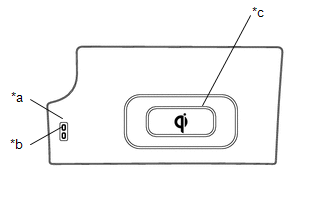 Text in Illustration
|
*a |
Indicator Light (Green) |
|
*b |
Indicator Light (Amber) |
|
*c |
Charging Area |
|
Indicator Light |
Operation Condition |
|
|---|---|---|
|
Green |
Amber |
|
|
Off |
Off |
No rechargeable device is on the charging area. |
|
Off |
On |
A rechargeable device is placed on the charging area or while recharging. |
|
On |
On |
Recharging is complete.*1 |
|
Blinks |
Blinks |
The indicators blink in the following situations:
|
|
Blinking Pattern |
Error Types |
|---|---|
|
Green - Green - Amber |
High charging area temperature*2 |
|
Green - Amber - Green |
Wire harness disconnection between certification ECU (smart key ECU assembly) and mobile wireless charger cradle assembly |
|
Amber - Green - Amber |
Charging error |
HINT:
*1: Some phones, cases or cover type wireless chargers may not cause the green
indicator to illuminate even though it is fully charged. Check the mobile device
to confirm charge status. Please refer to precaution for the details (See page
.gif) ).
).
*2: If foreign matter is present between the mobile wireless charger cradle assembly and a compatible rechargeable device, such as a cellular phone, charging efficiency is lowered and the foreign matter may heat up. If the mobile wireless charger cradle assembly detects heat from the foreign matter, the indicator lights will blink.
(c) When charging of the wireless charger stops temporarily
(1) If any of the following operations are performed with the electrical key transmitter sub-assembly present, charging may stop temporarily:
- Locking/unlocking the doors by touching the door handle
- Opening/closing the doors
- Starting the engine
- Locking the doors by pressing the lock button on the electrical key transmitter sub-assembly
- When the electrical key transmitter sub-assembly is out of the detection area
(2) If the mobile wireless charger cradle assembly surface becomes too hot during charging operation, the indicator lights (green and amber) on the mobile wireless charger cradle assembly will blink and charging will be canceled. If the surface cools down, the indicator light (green) will be illuminated and charging will be resumed.
 Parts Location
PARTS LOCATION
ILLUSTRATION
...
 System Diagram
SYSTEM DIAGRAM
...
Other materials:
Security Horn Assembly
Components
COMPONENTS
ILLUSTRATION
Inspection
INSPECTION
PROCEDURE
1. INSPECT SECURITY HORN ASSEMBLY
(a) Check the operation.
(1) Apply battery voltage and check operation of the security horn assembly.
OK:
Measurement Condition
Spe ...
Removal
REMOVAL
PROCEDURE
1. PRECAUTION
NOTICE:
After turning the ignition switch off, waiting time may be required before disconnecting
the cable from the negative (-) battery terminal. Therefore, make sure to read the
disconnecting the cable from the negative (-) battery terminal notices before pr ...
Diagnostic Trouble Code Chart
DIAGNOSTIC TROUBLE CODE CHART
HINT:
If a trouble code is displayed during the DTC check, inspect the trouble areas
listed for that code. For details of the code, refer to the "See page" below.
Lighting system
DTC Code
Detection Item
See page
...
