DESCRIPTION
- DTC C1ABD is stored when the blind spot monitor sensor RH detects a +B short in rear cross traffic alert buzzer (blind spot monitor buzzer) circuit.
- DTC C1ABE is stored when the blind spot monitor sensor RH detects a ground short or open in rear cross traffic alert buzzer (blind spot monitor buzzer) circuit.
|
DTC Code |
DTC Detection Condition |
Trouble Area |
|---|---|---|
|
C1ABD |
|
|
|
C1ABE |
|
|
WIRING DIAGRAM
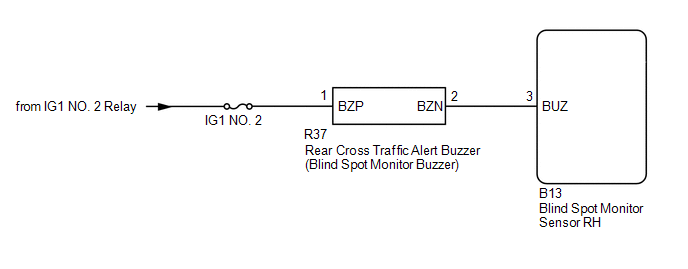
CAUTION / NOTICE / HINT
NOTICE:
- When checking for DTCs, make sure that the blind spot main switch assembly (warning canceling switch assembly) is on.
- Inspect the fuses for circuits related to this system before performing the following inspection procedure.
PROCEDURE
|
1. |
CHECK DTC |
(a) Clear the DTCs (See page .gif) ).
).
(b) Recheck for DTCs and check if the same DTC is output again (See page
).
OK:
No DTCs are output.
| OK | .gif) |
USE SIMULATION METHOD TO CHECK |
|
.gif)
|
2. |
CHECK HARNESS AND CONNECTOR (REAR CROSS TRAFFIC ALERT BUZZER - BATTERY AND BLIND SPOT MONITOR SENSOR RH) |
(a) Disconnect the R37 rear cross traffic alert buzzer (blind spot monitor buzzer) connector.
(b) Disconnect the B13 blind spot monitor sensor RH connector.
(c) Measure the resistance according to the value(s) in the table below.
Standard Resistance:
|
Tester Connection |
Condition |
Specified Condition |
|---|---|---|
|
R37-2 (BZN) - B13-3 (BUS) |
Always |
Below 1 Ω |
|
R37-2 (BZN) - Body ground |
Always |
10 kΩ or higher |
(d) Measure the voltage according to the value(s) in the table below.
Standard Voltage:
|
Tester Connection |
Switch Condition |
Specified Condition |
|---|---|---|
|
R37-1 (BZP) - Body ground |
Ignition switch ON |
11 to 14 V |
|
R37-1 (BZP) - Body ground |
Ignition switch off |
Below 1 V |
| NG | |
REPAIR OR REPLACE HARNESS OR CONNECTOR |
|
|
3. |
REPLACE BLIND SPOT MONITOR BUZZER (REAR CROSS TRAFFIC ALERT BUZZER) |
(a) Replace the rear cross traffic alert buzzer (blind spot monitor buzzer) with a new or normally functioning one.
- for Access Cab:
- for Double Cab:
|
|
4. |
CHECK DTC |
(a) Clear the DTCs (See page ).
(b) Recheck for DTCs and check if the same DTC is output again (See page
).
OK:
No DTCs are output.
| OK | |
END (REAR CROSS TRAFFIC ALERT BUZZER (BLIND SPOT MONITOR BUZZER) WAS DEFECTIVE) |
| NG | |
REPLACE BLIND SPOT MONITOR SENSOR RH |

