Toyota Tacoma manuals

Toyota Tacoma (2015-2018) Service Manual: Removal

REMOVAL

PROCEDURE

1. REMOVE LOWER INSTRUMENT PANEL FINISH PANEL SUB-ASSEMBLY RH

(See page 2. REMOVE LOWER INSTRUMENT PANEL ASSEMBLY 2. REMOVE LOWER INSTRUMENT PANEL ASSEMBLY )

2. REMOVE LOWER INSTRUMENT PANEL ASSEMBLY

(See page 3. REMOVE AIR CONDITIONING CONTROL ASSEMBLY )

3. REMOVE AIR CONDITIONING CONTROL ASSEMBLY

(a) for Automatic Air Conditioning System (See page (b) for Manual Air Conditioning System (See page (b) for Manual Air Conditioning System (See page )

(b) for Manual Air Conditioning System (See page 4. REMOVE FRONT CONSOLE BOX 4. REMOVE FRONT CONSOLE BOX )

4. REMOVE FRONT CONSOLE BOX

(See page 5. REMOVE NO. 2 INSTRUMENT PANEL GARNISH SUB-ASSEMBLY 5. REMOVE NO. 2 INSTRUMENT PANEL GARNISH SUB-ASSEMBLY )

5. REMOVE NO. 2 INSTRUMENT PANEL GARNISH SUB-ASSEMBLY

(See page 6. REMOVE INSTRUMENT PANEL LOWER CENTER FINISH PANEL 6. REMOVE INSTRUMENT PANEL LOWER CENTER FINISH PANEL )

6. REMOVE INSTRUMENT PANEL LOWER CENTER FINISH PANEL

(See page 7. REMOVE NO. 1 STEREO JACK ADAPTER ASSEMBLY 7. REMOVE NO. 1 STEREO JACK ADAPTER ASSEMBLY )

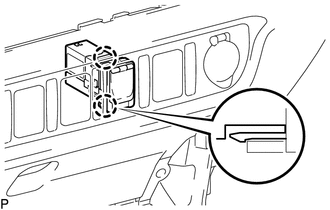
7. REMOVE NO. 1 STEREO JACK ADAPTER ASSEMBLY

(a) Disengage the 2 claws to remove the No. 1 stereo jack adapter assembly.

Components
COMPONENTS ILLUSTRATION ...

Installation
INSTALLATION PROCEDURE 1. INSTALL NO. 1 STEREO JACK ADAPTER ASSEMBLY (a) Engage the 2 claws to install the No. 1 stereo jack adapter assembly. 2. INSTALL INSTRUMENT PANEL LOWER CENTER FINISH PANEL ...

Other materials:

A/C ECU Vehicle Information Reading/Writing Processor Malfunction (B15F5)
DESCRIPTION This DTC is stored when items controlled by the Air conditioning amplifier assembly cannot be customized via the navigation system vehicle customization screen. HINT: The Air conditioning amplifier assembly controls the air conditioning system related items that are customizable v ...

Does not Play even after Bluetooth Audio Mode is Selected
CAUTION / NOTICE / HINT HINT: Even if the portable player can play audio content, it may not be able to play via the in-vehicle device. This does not necessarily indicate a malfunction of the in-vehicle device. PROCEDURE 1. CHECK OPERATION (a) Check if the po ...

Data List / Active Test
DATA LIST / ACTIVE TEST 1. DATA LIST HINT: Using the Techstream to read the Data List allows the values or states of switches, sensors, actuators and other items to be read without removing any parts. This non-intrusive inspection can be very useful because intermittent conditions or signals ...

В© 2011-2026 Copyright www.ttguide.net