REMOVAL
PROCEDURE
1. REMOVE NO. 2 ENGINE UNDER COVER SUB-ASSEMBLY (w/ Off Road Package)
2. REMOVE NO. 1 ENGINE UNDER COVER SUB-ASSEMBLY
3. REMOVE FAN AND GENERATOR V BELT
4. DRAIN POWER STEERING FLUID
5. REMOVE FRONT FENDER APRON UPPER SEAL RH
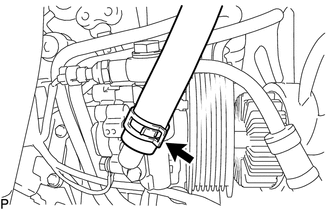
6. DISCONNECT NO. 1 OIL RESERVOIR TO PUMP HOSE
|
(a) Slide the clip and disconnect the No. 1 oil reservoir to pump hose. |
|
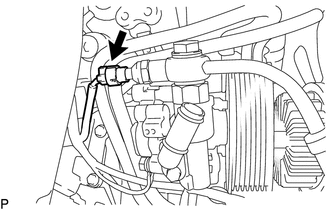
7. DISCONNECT PRESSURE FEED TUBE ASSEMBLY
|
(a) Disconnect the oil pressure switch connector. |
|
|
(b) Remove the union bolt to disconnect the pressure feed tube assembly. |
|
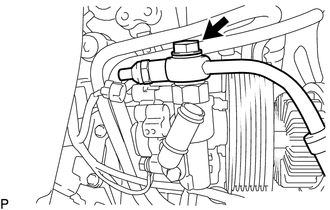
(c) Remove the gasket from the pressure feed tube assembly.
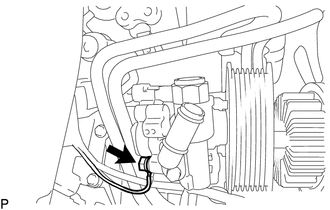
8. REMOVE VANE PUMP ASSEMBLY
|
(a) Remove the bolt to disconnect the ground wire. |
|
|
(b) Remove the 2 bolts and vane pump assembly. |
|
Disassembly
InspectionCenter Airbag Sensor Assembly
Components
COMPONENTS
ILLUSTRATION
On-vehicle Inspection
ON-VEHICLE INSPECTION
PROCEDURE
1. INSPECT AIRBAG SENSOR ASSEMBLY (for Vehicle not Involved in Collision)
(a) Perform a diagnostic system check (See page
).
2. INSPECT AIRBAG SENSOR ASSEMBLY (for Vehicle Involved in Collision a ...
Dtc Check / Clear
DTC CHECK / CLEAR
1. CHECK DTC (for TIRE PRESSURE WARNING ECU AND RECEIVER) (USING TECHSTREAM)
(a) Turn the ignition switch off.
(b) Connect the Techstream to the DLC3.
(c) Turn the ignition switch to ON.
(d) Turn the Techstream on.
(e) Enter the following menus: Chassis / Tire Pressure Monito ...
Screen Flicker or Color Distortion
PROCEDURE
1.
CHECK DISPLAY SETTING
(a) Reset display settings (contrast, brightness) and check that the screen appears
normal.
OK:
The display returns to normal.
OK
END
NG
PROCEED TO NEXT SUSPECTED AREA SHOWN IN ...