DESCRIPTION
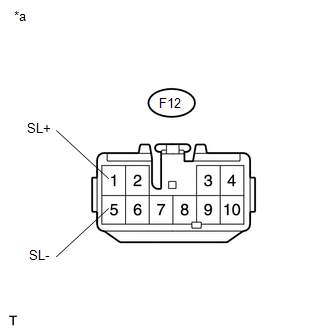
This DTC is output when a malfunction is detected due to a battery short occurring in the differential lock coil drive circuit of the rear differential.
|
DTC No. |
Detection Item |
DTC Detection Condition |
Trouble Area |
|---|---|---|---|
|
P17C1 |
Rear Differential Lock Solenoid Circuit High |
|
|
WIRING DIAGRAM
Refer to DTC P17C0 (See page .gif) ).
).
PROCEDURE
|
1. |
CHECK DIFFERENTIAL LOCK COIL |
(a) Disconnect the 4 wheel drive control ECU connector.
|
(b) Measure the voltage according to the value(s) in the table below. Standard Voltage:
|
|
| OK | .gif) |
REPLACE 4 WHEEL DRIVE CONTROL ECU |
|
.gif)
|
2. |
CHECK HARNESS AND CONNECTOR (4 WHEEL DRIVE CONTROL ECU - DIFFERENTIAL LOCK COIL) |
(a) Disconnect the F12 4 wheel drive control ECU connector.
(b) Disconnect the D28 differential lock coil connector.
(c) Measure the voltage according to the value(s) in the table below.
Standard Voltage:
|
Tester Connection |
Switch Condition |
Specified Condition |
|---|---|---|
|
F12-1 (SL+) or D28-2 (SL+) - Body ground |
Ignition switch ON |
Below 1 V |
|
F12-5 (SL-) or D28-1 (SL-) - Body ground |
Ignition switch ON |
Below 1 V |
| OK | |
REPLACE DIFFERENTIAL LOCK COIL |
| NG | |
REPAIR OR REPLACE HARNESS OR CONNECTOR |