
Toyota Tacoma (2005–2015) Owners Manual: Power windows*
The power windows can be opened/closed using the following switches.
 Driver’s power window switches
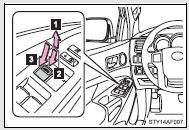
 Closing
 Opening
 One-touch opening (driver’s window
only)*
One-touch opening (driver’s window
only)*
*: To stop the window partway, operate the switch in the opposite direction.
 Front and rear passenger’s power
window switch
Front and rear passenger’s power
window switch
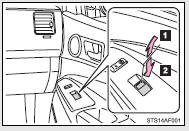
 Closing
 Opening
Lock switch
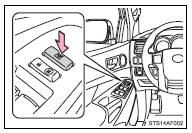
Press the switch down to lock passenger window switches.
Use this switch to prevent children from accidentally opening or closing a passenger window.
■The power windows can be operated when
The engine switch is in the ON position.
■Operating the power windows after turning the engine off
The power windows can be operated for approximately 43 seconds even after the engine switch is turned to the ACC or LOCK position. They cannot, however, be operated once either front door is opened.
CAUTION
■Closing the windows
Observe the following precautions.
Failing to do so may result in death or serious injury.
●Check to make sure that all passengers do not have any part of their body in a position where it could be caught when a window is being operated.
●Do not allow children to operate the power windows.
Closing a power window on someone can cause serious injury, and in some instances, even death.

 Back window (vehicles with sliding type)
The back window can be opened and closed using the lock release lever.
Open/close
Push the lock release lever and slide the back window.
■Closing the back window
Make sure that the back wi ...
Other materials:
Diagnostic Trouble Code Chart
DIAGNOSTIC TROUBLE CODE CHART
Main Body ECU (Multiplex Network Body ECU)
DTC Code
Detection Item
See page
B1206
P/W Master Switch Communication Stop
B1273
Sliding Roof ECU Communication Stop
...
Diagnostic Trouble Code Chart
DIAGNOSTIC TROUBLE CODE CHART
HINT:
If a trouble code is stored during the DTC check, inspect the trouble areas listed
for that code. For details of the code, refer to "See page" below.
Transponder Key ECU Assembly
DTC Code
Detection Item
See page
...
Disposal
DISPOSAL
CAUTION / NOTICE / HINT
HINT:
The tire pressure warning valve and transmitter is powered by a lithium battery.
When disposing of the tire pressure warning valve and transmitter, remove the battery
and dispose of it correctly.
PROCEDURE
1. DISPOSE OF TIRE PRESSURE WARNING VALVE AND ...
