
Toyota Tacoma (2015-2018) Service Manual: On-vehicle Inspection
ON-VEHICLE INSPECTION
PROCEDURE
1. INSPECT FRONT AXLE HUB BEARING
(a) Remove the front wheel.
(b) for 4WD:
(1) Remove the front axle hub grease cap (See page
.gif) ).
).
(c) Remove the front disc brake caliper (See page
).
(d) Remove the front disc.
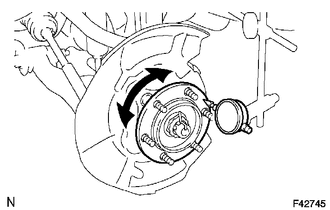
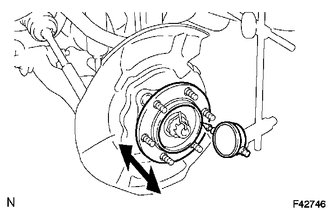
(e) Inspect the axle hub backlash.
(1) Using a dial indicator, check the backlash near the center of the axle hub.
Maximum:
0.05 mm (0.0020 in.)
If the backlash exceeds the maximum, replace the bearing.
|
(f) Inspect the axle hub deviation. (1) Using a dial indicator, check the distortion of the surface of the axle hub. Maximum: 0.05 mm (0.0020 in.) If the deviation exceeds the maximum, replace the bearing. |
|
2. INSPECT REAR AXLE HUB BEARING
(a) Remove the rear wheel.
(b) Remove the rear brake drum (See page ).
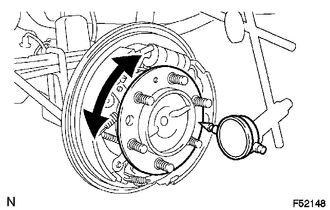
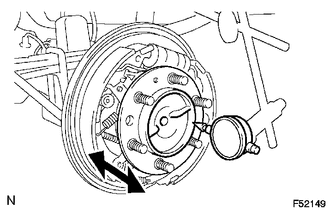
(c) Inspect the axle shaft backlash.
(1) Using a dial indicator, check the backlash near the center of the axle shaft.
Maximum:
0.05 mm (0.0020 in.)
If the backlash exceeds the maximum, replace the bearing.
|
(d) Inspect the axle shaft deviation. (1) Using a dial indicator, check the distortion of the surface of the axle shaft. Maximum: 0.05 mm (0.0020 in.) If the deviation exceeds the maximum, replace the bearing. |
|
 Problem Symptoms Table
PROBLEM SYMPTOMS TABLE
HINT:
Use the table below to help determine the cause of problem symptoms. If multiple
suspected areas are listed, the potential causes of the symptoms are listed in order
...
 Front Axle Hub
...
Other materials:
Short to GND in Outer Mirror Indicator(Master) (C1AB2)
DESCRIPTION
This DTC is stored when the blind spot monitor sensor LH detects a ground short
in the blind spot monitor indicator LH.
DTC Code
DTC Detection Condition
Trouble Area
C1AB2
With the blind spot monitor main switch assembly (w ...
Front Speed Sensor
Removal
REMOVAL
PROCEDURE
1. PRECAUTION
NOTICE:
After turning the ignition switch off, waiting time may be required before disconnecting
the cable from the negative (-) battery terminal.
Therefore, make sure to read the disconnecting the cable from the negative (-)
battery terminal notic ...
Diagnosis System
DIAGNOSIS SYSTEM
1. DESCRIPTION
(a) Air conditioning system data and the Diagnostic Trouble Codes (DTCs) can
be read through the Data Link Connector 3 (DLC3) of the vehicle. When the system
seems to be malfunctioning, use the Techstream to check for malfunctions and perform
troubleshooting.
...
