
Toyota Tacoma (2015-2018) Service Manual: Installation
INSTALLATION
PROCEDURE
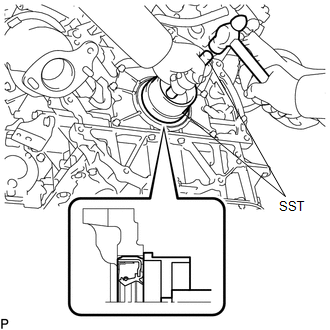
1. INSTALL REAR ENGINE OIL SEAL
(a) Apply MP grease to the lip of a new rear engine oil seal.
NOTICE:
Keep the lip free of foreign matter.
|
(b) Using SST, tap in a new rear engine oil seal until its surface is flush with the rear engine oil seal retainer edge. SST: 09223-15030 SST: 09950-70010 09951-07100 NOTICE:
|
|
2. INSTALL DRIVE PLATE AND RING GEAR SUB-ASSEMBLY (for Automatic Transmission)
.gif)
3. INSTALL FLYWHEEL SUB-ASSEMBLY (for Manual Transmission)
4. INSTALL CLUTCH DISC ASSEMBLY (for Manual Transmission)
5. INSTALL CLUTCH COVER ASSEMBLY (for Manual Transmission)
6. INSTALL AUTOMATIC TRANSMISSION ASSEMBLY (for Automatic Transmission)
|
Transmission |
See page |
|---|---|
|
AC60E |
|
|
AC60F |
|
7. INSTALL MANUAL TRANSMISSION ASSEMBLY (for Manual Transmission)
(See page )
 Removal
REMOVAL
PROCEDURE
1. REMOVE AUTOMATIC TRANSMISSION ASSEMBLY (for Automatic Transmission)
Transmission
See page
AC60E
AC60F
...
 2gr-fks Exhaust
...
Other materials:
Cellular Phone Inspection
PROCEDURE
1.
CHECK USAGE CONDITION
(a) Check that the vehicle and cellular phone meet the following conditions:
NOTICE:
If changing cellular phone settings, updating software, etc. is necessary, make
sure to obtain the permission of the customer before performin ...
Open in Pump Motor Circuit (C1251)
DESCRIPTION
The motor relay (semiconductor relay) is built into the master cylinder solenoid
and drives the pump motor based on a signal from the skid control ECU (master cylinder
solenoid).
DTC No.
DTC Detecting Condition
Trouble Areas
C1251
...
Steering Pad Switch
Components
COMPONENTS
ILLUSTRATION
Removal
REMOVAL
PROCEDURE
1. REMOVE STEERING PAD
(See page
)
2. REMOVE STEERING PAD SWITCH ASSEMBLY
(a) Disconnect the 2 connectors.
(b) Disengage the 2 clamps.
(c) Remove the 4 screws.
...
