Toyota Tacoma manuals

Toyota Tacoma (2015-2018) Service Manual: Installation

INSTALLATION

PROCEDURE

1. SET NO. 1 CYLINDER TO TDC/COMPRESSION

2. INSTALL CAMSHAFT TIMING GEAR BOLT

2. INSTALL CAMSHAFT TIMING GEAR BOLT

NOTICE:

There are different types of camshaft timing gear bolts. Make sure to check the identification mark to determine the tightening torque.
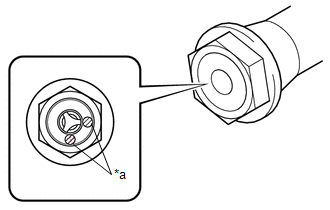
*a

Identification Mark Stamp

Identification Mark

Item

Identification Mark Stamp

Intake Side

Exhaust Side

Type A

A

B

Type B

D

G

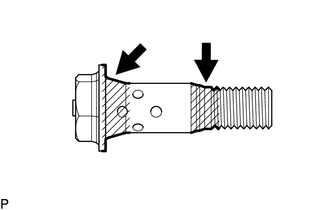
(a) Apply engine oil to the areas of the camshaft timing gear bolt shown in the illustration.

(b) Temporarily install the camshaft timing gear bolt.

Torque:

10 N·m {102 kgf·cm, 7 ft·lbf}

HINT:

Make sure that the flange part of the camshaft timing gear bolt is directly contacting the camshaft timing gear assembly.

(c) Loosen the camshaft timing gear bolt 60 to 180°.

(d) Using SST, hold the crankshaft pulley assembly.

SST: 09213-54015

91651-60855

SST: 09330-00021

(e) Tighten the camshaft timing gear bolt.

Torque:

for Type A :

120 N·m {1224 kgf·cm, 89 ft·lbf}

for Type B :

95 N·m {969 kgf·cm, 70 ft·lbf}

3. INSTALL CAMSHAFT TIMING OIL CONTROL SOLENOID ASSEMBLY

(See page 4. INSTALL NO. 1 ENGINE UNDER COVER SUB-ASSEMBLY )

4. INSTALL NO. 1 ENGINE UNDER COVER SUB-ASSEMBLY

Torque:

30 N·m {306 kgf·cm, 22 ft·lbf}

5. INSTALL NO. 2 ENGINE UNDER COVER SUB-ASSEMBLY (w/ Off Road Package)

Torque:

30 N·m {306 kgf·cm, 22 ft·lbf}

Removal
REMOVAL CAUTION / NOTICE / HINT NOTICE: If one of the camshaft timing gear bolts is already removed, do not remove any other camshaft timing gear bolts. PROCEDURE 1. REMOVE NO. 2 ENGINE UNDER C ...

Camshaft Oil Control Valve(for Exhaust Side Of Bank 2)
...

Other materials:

Precaution
PRECAUTION 1. IGNITION SWITCH EXPRESSIONS (a) The type of ignition switch used on this model differs according to the specifications of the vehicle. The expressions listed in the table below are used in this section. Expression Ignition Switch (Position) Engine ...

Data List / Active Test
DATA LIST / ACTIVE TEST HINT: By accessing the Data List displayed by the Techstream, you can check values of switches and sensors without removing any parts. Reading the Data List as the first step of troubleshooting is one method to shorten diagnostic time. 1. DATA LIST FOR OCCUPANT DETECTI ...

Listening to Bluetooth® audio
The Bluetooth® audio system enables the user to enjoy music played on a portable player from the vehicle speakers via wireless communication. Select “ Audio” on the “Select Audio Source” screen. When a Bluetooth® device cannot be connected, check the connection status on the “Bluet ...

© 2011-2026 Copyright www.ttguide.net