
Toyota Tacoma (2015-2018) Service Manual: Ignition Switch
Components
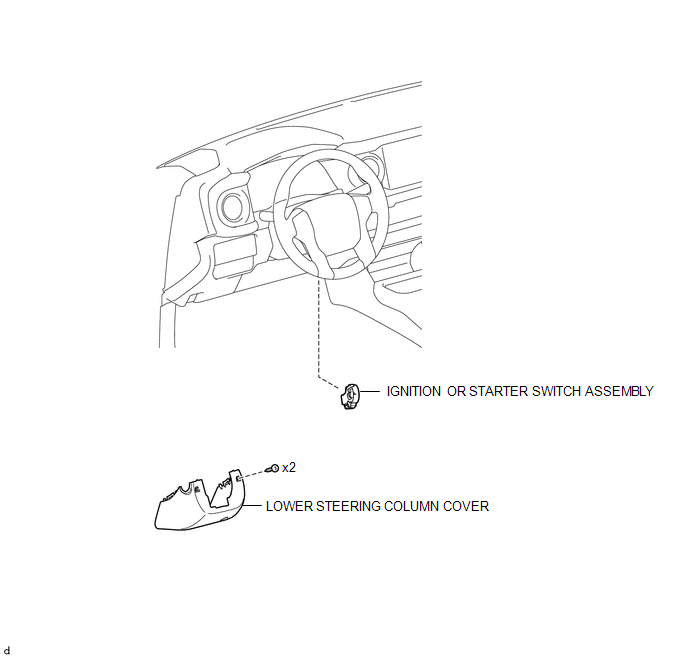
COMPONENTS
ILLUSTRATION
Removal
REMOVAL
PROCEDURE
1. REMOVE LOWER STEERING COLUMN COVER
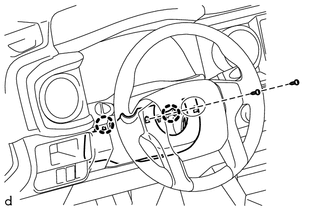
(a) Remove the 2 screws.
(b) Disengage the 2 claws and remove the lower steering column cover.
2. REMOVE IGNITION OR STARTER SWITCH ASSEMBLY
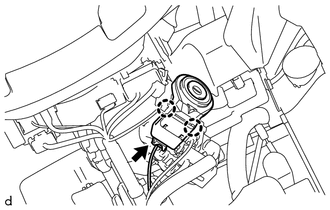
(a) Disconnect the connector.
(b) Disengage the 2 claws and remove the ignition or starter switch assembly.
Inspection
INSPECTION
PROCEDURE
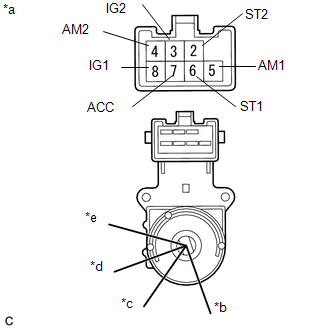
1. INSPECT IGNITION OR STARTER SWITCH ASSEMBLY
|
(a) Check the resistance. Text in Illustration
(1) Measure the resistance according to the value(s) in the table below. Standard Resistance:
If the result is not as specified, replace the ignition or starter switch assembly. |
|
Installation
INSTALLATION
PROCEDURE
1. INSTALL IGNITION OR STARTER SWITCH ASSEMBLY
(a) Engage the 2 claws and install the ignition or starter switch assembly.
(b) Connect the connector.
2. INSTALL LOWER STEERING COLUMN COVER
(a) Engage the 2 claws and install the lower steering column cover.
(b) Install the 2 screws.
HINT:
Turn the steering wheel to the right and left as necessary to install the 2 screws.
 Engine Switch
Components
COMPONENTS
ILLUSTRATION
Inspection
INSPECTION
PROCEDURE
1. INSPECT ENGINE SWITCH
(a) Measure the resistance according to the value(s) in the table below.
Text in Illustration ...

Other materials:
Front Camera Module Communication Stop Mode
DESCRIPTION
Detection Item
Symptom
Trouble Area
Front Camera Module Communication Stop Mode
Either Condition is met:
Communication stop for "Front Camera Module" is indicated on
the "Communication Bus Ch ...
Low Power Supply Voltage Malfunction (C1241)
DESCRIPTION
If there is a problem with the skid control ECU (master cylinder solenoid) power
supply circuit, the skid control ECU outputs the DTC and prohibits operation under
the fail-safe function.
If the voltage supplied to terminal IG1 is not within the DTC detection threshold
due to mal ...
Removal
REMOVAL
PROCEDURE
1. REMOVE FUEL TANK ASSEMBLY
Click here
2. DISCONNECT FUEL TANK MAIN TUBE SUB-ASSEMBLY
Click here
3. REMOVE FUEL PUMP GAUGE RETAINER
NOTICE:
Before performing these procedures, first cover the connectors and tube joints
of the fuel suction tube with pump and gauge ass ...
