Toyota Tacoma manuals

Toyota Tacoma (2005–2015) Owners Manual: Hood

Release the lock from the inside of the vehicle to open the hood.
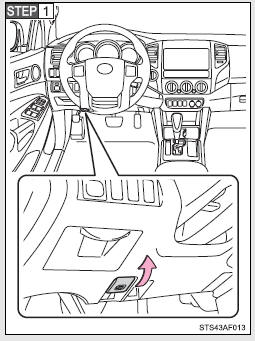
Pull the hood release lever.

Pull the hood release lever.

The hood will pop up slightly.
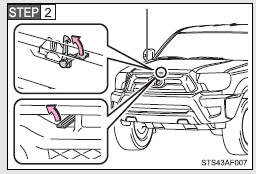
Pull up the hood catch lever and lift the hood.
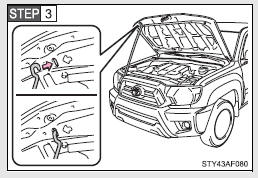
Pull up the hood catch lever and lift the hood.

Hold the hood open by inserting the supporting rod into the slot.

Hold the hood open by inserting the supporting rod into the slot.

CAUTION

■Pre-driving check

Check that the hood is fully closed and locked.

If the hood is not locked properly, it may open while the vehicle is in motion and cause an accident, which may result in death or serious injury.

■After installing the support rod into the slot

Make sure the rod supports the hood securely from falling down on to your head or body.

NOTICE

■When closing the hood

Be sure to return the support rod to its clip before closing the hood. Closing the hood with the support rod up could cause the hood to bend.

Do-it-yourself service precautions
If you perform maintenance yourself, be sure to follow the correct procedures as given in these sections. CAUTION The engine compartment contains many mechanisms and fluids that may move sudde ...

Engine compartment
2.7 L 4-cylinder (2TR-FE) engine 1. Washer fluid tank 2.Radiator cap 3.Engine coolant reservoir 4. Engine oil filler cap 5. Power steering fluid reservoir 6. Engine oil level dipstick 7. Bra ...

Other materials:

Cellular Phone Registration Failure
PROCEDURE 1. CHECK USAGE CONDITION (a) Check that the vehicle and cellular phone meet the following conditions: NOTICE: If changing cellular phone settings, updating software, etc. is necessary, make sure to obtain the permission of the customer before performin ...

Removal
REMOVAL PROCEDURE 1. REMOVE FRONT CONSOLE BOX (See page ) 2. DISCONNECT TRANSMISSION CONTROL CABLE ASSEMBLY (a) Move the shift lever to N. (b) Disconnect the end of the transmission control cable assembly from the transmission floor shift assembly. Text in Illustration ...

Setup menu
You can adjust the multimedia system to your desired settings. Display “Setup” screen Press the “SETUP” button to display the “Setup” screen. Select to adjust the settings for operation sounds, screen animation, etc. Select to set the voice settings. Select to adjust the sett ...

© 2011-2026 Copyright www.ttguide.net