
Toyota Tacoma (2015-2018) Service Manual: Front Passenger Side Seat Belt Warning Light Malfunction
DESCRIPTION
The occupant classification ECU detects the state of the front seat inner belt assembly RH and load sensor when the front passenger side seat is occupied with the ignition switch ON. If the front passenger side seat belt is not fastened, the front passenger side seat belt warning light on the combination meter assembly blinks. If the seat belt is fastened, the warning light goes off.
WIRING DIAGRAM
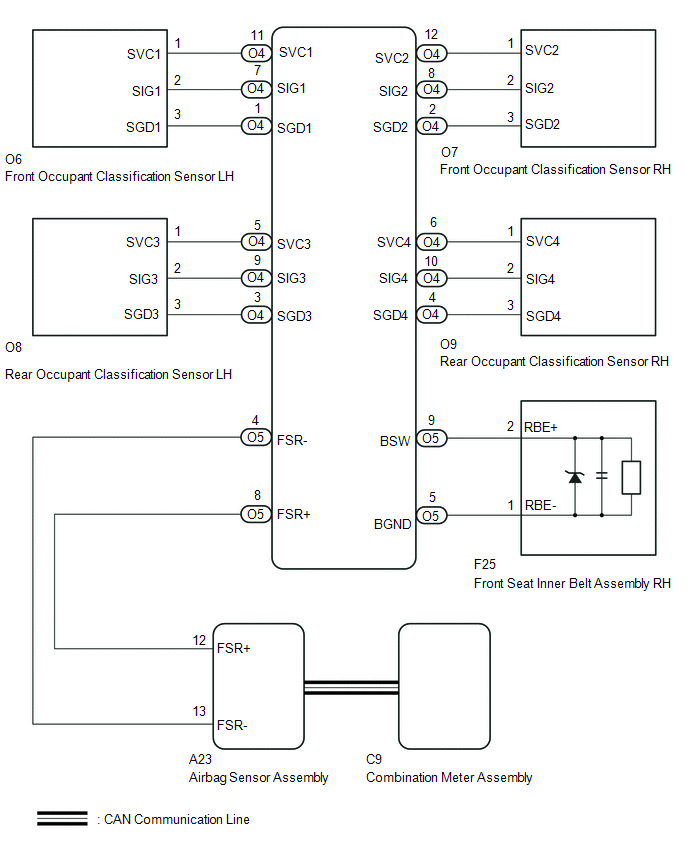
PROCEDURE
|
1. |
CHECK DTC OUTPUT (OCCUPANT CLASSIFICATION SYSTEM) |
(a) Clear the DTCs (See page .gif) ).
).
(b) Check for DTCs (See page ).
|
Result |
Proceed to |
|---|---|
|
DTCs are not output |
A |
|
DTCs are output |
B |
| B | .gif) |
GO TO OCCUPANT CLASSIFICATION SYSTEM |
|
.gif)
|
2. |
CHECK DTC OUTPUT (AIRBAG SYSTEM) |
(a) Clear the DTCs (See page ).
(b) Check for DTCs (See page ).
|
Result |
Proceed to |
|---|---|
|
DTCs are not output |
A |
|
DTCs are output |
B |
| B | |
GO TO AIRBAG SYSTEM |
|
|
3. |
READ VALUE USING TECHSTREAM (PASSENGER BUCKLE SW) |
(a) Connect the Techstream to the DLC3.
(b) Turn the ignition switch to ON.
(c) Turn the Techstream on.
(d) Enter the following menus: Body Electrical / Occupant Detection / Data List.
(e) Read the Data List according to the display on the Techstream.
Occupant Detection|
Tester Display |
Measurement Item/Range |
Normal Condition |
Diagnostic Note |
|---|---|---|---|
|
Passenger Buckle SW |
Front passenger side seat belt buckle switch/Unset, Set or NG |
Unset: Front passenger side seat belt unfastened Set: Front passenger side seat belt fastened NG: Data not determined |
- |
|
Result |
Proceed to |
|---|---|
|
Unset or Set is displayed on the Techstream according to the front passenger seat belt condition |
A |
|
Unset or Set is not displayed correctly on the Techstream according to the front passenger seat belt condition |
B |
|
NG is displayed on the Techstream |
C |
| B | |
REPLACE FRONT SEAT INNER BELT ASSEMBLY RH |
| C | |
REPLACE OCCUPANT CLASSIFICATION ECU |
|
|
4. |
READ VALUE USING TECHSTREAM (RIGHT SIDE BUCKLE SW) |
(a) Connect the Techstream to the DLC3.
(b) Turn the ignition switch to ON.
(c) Turn the Techstream on.
(d) Enter the following menus: Body Electrical / SRS Airbag / Data List.
(e) Read the Data List according to the display on the Techstream.
SRS Airbag|
Tester Display |
Measurement Item/Range |
Normal Condition |
Diagnostic Note |
|---|---|---|---|
|
Right side Buckle SW |
Front passenger side seat belt buckle switch/Unset, Set or NG |
Unset: Front passenger side seat belt unfastened Set: Front passenger side seat belt fastened NG: Data not determined |
- |
|
Result |
Proceed to |
|---|---|
|
Unset or Set is displayed on the Techstream according to the front passenger seat belt condition |
A |
|
B |
| A | |
USE SIMULATION METHOD TO CHECK |
| B | |
REPLACE AIRBAG SENSOR ASSEMBLY |
 On-vehicle Inspection
ON-VEHICLE INSPECTION
PROCEDURE
1. INSPECT DRIVER SEAT BELT WARNING LIGHT
HINT:
The seat belt warning light on the combination meter assembly is used for both
the driver seat and front passenger ...
 Sliding Roof
...
Other materials:
Steering Angle Sensor Initialization Incomplete (C1439,C1445)
DESCRIPTION
The skid control ECU (brake actuator assembly) acquires steering angle sensor
zero point every time the ignition switch is turned ON and the vehicle is driven
at 35 km/h (22 mph) or more for approximately 5 seconds. The ECU also stores the
previous zero point.
The steering angle ...
Dtc Check / Clear
DTC CHECK / CLEAR
1. CHECK FOR TRANSPONDER KEY ECU ASSEMBLY DTC
(a) Connect the Techstream to the DLC3.
(b) Turn the ignition switch to ON.
(c) Turn the Techstream on.
(d) Enter the following menus: Body Electrical / Immobiliser / Trouble Codes.
(e) Check the details of the DTC(s) (See page
...
Removal
REMOVAL
CAUTION / NOTICE / HINT
NOTICE:
Release the vacuum from booster by depressing the brake pedal several times.
Then remove the brake master cylinder from brake booster.
PROCEDURE
1. PRECAUTION
NOTICE:
After turning the ignition switch off, waiting time may be required before disconnect ...
