DISASSEMBLY
PROCEDURE
1. REMOVE TAIL GATE PROTECTOR
(See page .gif) )
)
2. REMOVE TAIL GATE SERVICE HOLE COVER
|
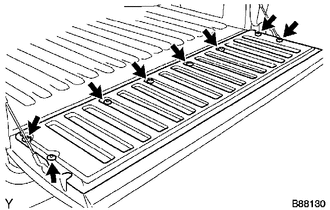
(a) Using a T30 "TORX" socket wrench, remove the 8 screws and tail gate service hole cover. |
|
3. REMOVE REAR TELEVISION CAMERA ASSEMBLY
4. REMOVE TAIL GATE LOCK ASSEMBLY LH
|
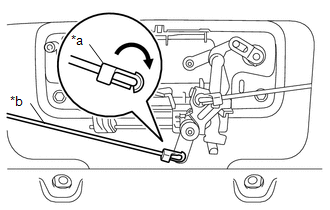
(a) Disconnect the snap and tail gate lock control link from the tail gate handle assembly as shown in the illustration. Text in Illustration
|
|
|
(b) Disengage the clamp. |
|
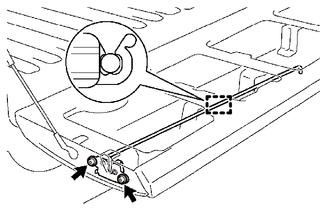
(c) Using a T40 "TORX" socket wrench, remove the 2 bolts and tail gate lock assembly LH.
5. REMOVE TAIL GATE LOCK ASSEMBLY RH
|
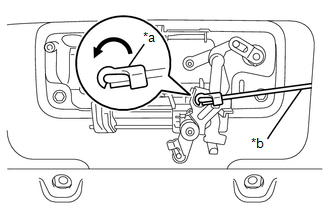
(a) Disconnect the snap and tail gate lock control link from the tail gate handle assembly as shown in the illustration. Text in Illustration
|
|
|
(b) Disengage the clamp. |
|
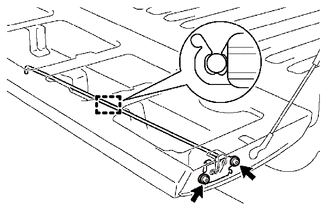
(c) Using a T40 "TORX" socket wrench, remove the 2 bolts and tail gate lock assembly RH.
6. REMOVE TAIL GATE LOCK CONTROL LINK
|
(a) Disconnect the snap to remove the tail gate lock control link from the tail gate lock assembly LH as shown in the illustration. Text in Illustration
HINT: Use the same procedure for the LH side and RH side. |
|
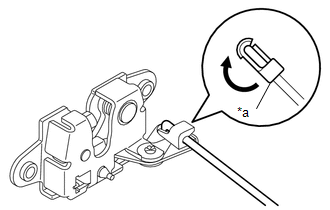
7. REMOVE TAIL GATE HANDLE ASSEMBLY
|
(a) Remove the 2 bolts. |
|
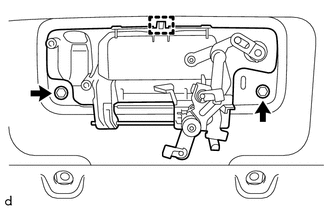
(b) Disengage the guide to remove the tail gate handle assembly.
8. REMOVE TAIL GATE LOCK STRIKER
|
(a) Using a T40 "TORX" socket wrench, remove the 2 bolts and tail gate lock striker. HINT: Use the same procedure for the LH side and RH side. |
|
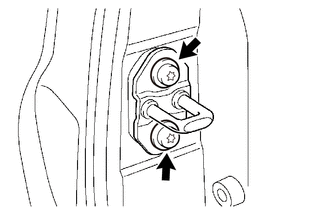
9. REMOVE TAIL GATE
|
(a) Disengage the clamp. |
|
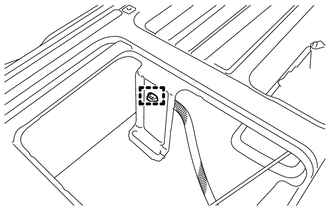
|
(b) Disengage the clamp. |
|
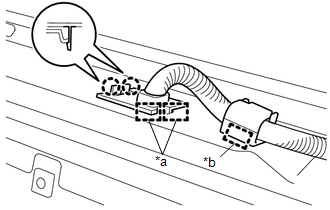
(c) Disengage the 2 claws and 2 guides to disconnect the wire harness from the tail gate.
Text in Illustration|
*a |
Guide |
|
*b |
Clamp |
|
(d) Disengage the tail gate stay from the tail gate stay stopper as shown in the illustration. HINT: Use the same procedure for the LH side and RH side. |
|
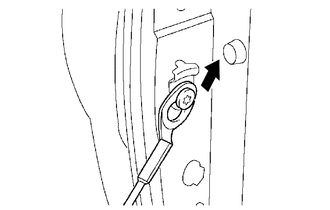
|
(e) Remove the tail gate from the vehicle in the order shown in the illustration. NOTICE: Be careful not to drop the tail gate. HINT: Remove the tail gate from the vehicle by lifting up the right side and sliding it slightly to the right. |
|
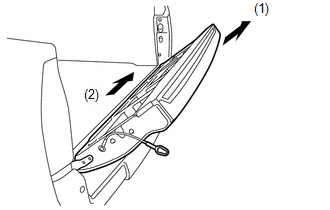
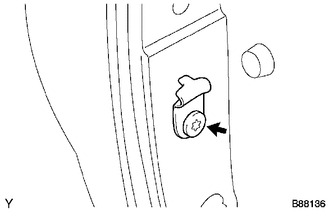
10. REMOVE TAIL GATE STAY STOPPER
|
(a) Using a T40 "TORX" socket wrench, remove the tail gate stay shaft and tail gate stopper. HINT: Use the same procedure for the LH side and RH side. |
|
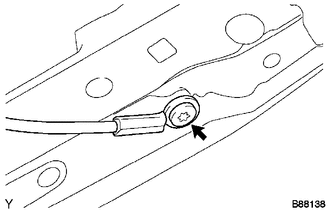
11. REMOVE TAIL GATE STAY ASSEMBLY
|
(a) Using a T40 "TORX" socket wrench, remove the tail gate stay shaft, washer and tail gate stay assembly. HINT: Use the same procedure for the LH side and RH side. |
|
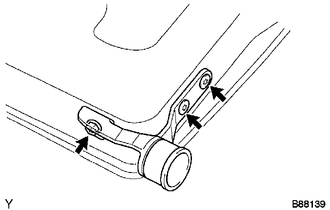
12. REMOVE TAIL GATE HINGE ASSEMBLY LH
|
(a) Using a T40 "TORX" socket wrench, remove the bolt, 2 screws and tail gate hinge assembly LH. |
|
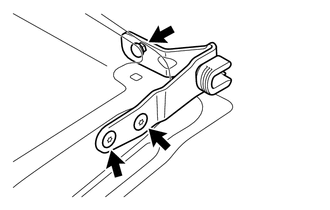
13. REMOVE TAIL GATE HINGE ASSEMBLY RH
|
(a) Using a T40 "TORX" socket wrench, remove the bolt, 2 screws and tail gate hinge assembly RH. |
|
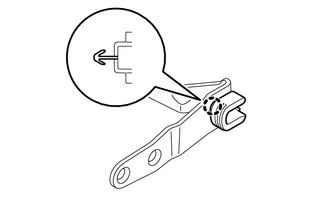
14. REMOVE SIDE GATE SUPPORT FEMALE HINGE RH
|
(a) Disengage the claw to remove the side gate support female hinge RH. |
|
15. REMOVE NO. 2 REAR BODY NAME PLATE (for 4WD)
16. REMOVE NO. 3 REAR BODY NAME PLATE (for 2GR-FKS)

