DISASSEMBLY
PROCEDURE
1. REMOVE SHIFT LOCK RELEASE BUTTON COVER
(a) Using a screwdriver with its tip wrapped in protective tape, detach the 2 claws to remove the shift lock release button cover from the console upper panel sub-assembly.
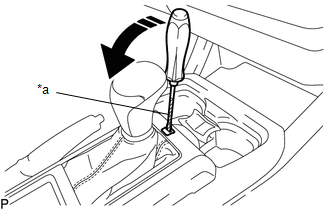
Text in Illustration
|
*a |
Protective Tape |
|
Remove in this Direction |
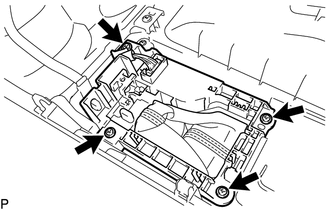
2. REMOVE SHIFT POSITION INDICATOR
|
(a) Remove the 4 screws and shift position indicator from the console upper panel sub-assembly. |
|
3. REMOVE INDICATOR LIGHT WIRE SUB-ASSEMBLY
|
(a) Detach the clamp to separate the indicator light wire sub-assembly from the shift position indicator. |
|
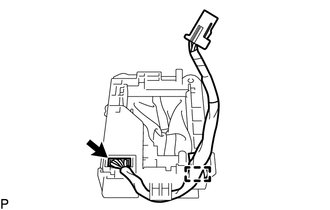
(b) Disconnect the connector to remove the indicator light wire sub-assembly from the shift position indicator.
Components
On-vehicle InspectionTorque Converter Clutch Pressure Control Solenoid Control Circuit Open (P275613)
DESCRIPTION
Refer to the system description for DTC P27567F (See page
).
DTC No.
DTC Detection Condition
Trouble Area
SAE
P275613
Open or short is detected in shift solenoid valve SLU circuit for 1 second
or more while d ...
Display does not Dim when Light Control Switch is Turned ON
PROCEDURE
1.
CHECK IMAGE QUALITY SETTING
(a) Display the "Display Settings" screen.
(b) Turn the light control switch to the tail or head position.
(c) Check if "Day Mode" on the display adjustment screen is on.
OK:
"Day Mode" sett ...
Cellular Phone cannot Send/Receive
PROCEDURE
1.
CHECK "Bluetooth" SETTINGS
(a) Check if the cellular phone is registered as a connected device and the "Bluetooth"
settings are correct.
OK:
The cellular phone is registered as a connected device and "Bluetooth" settin ...