COMPONENTS
ILLUSTRATION
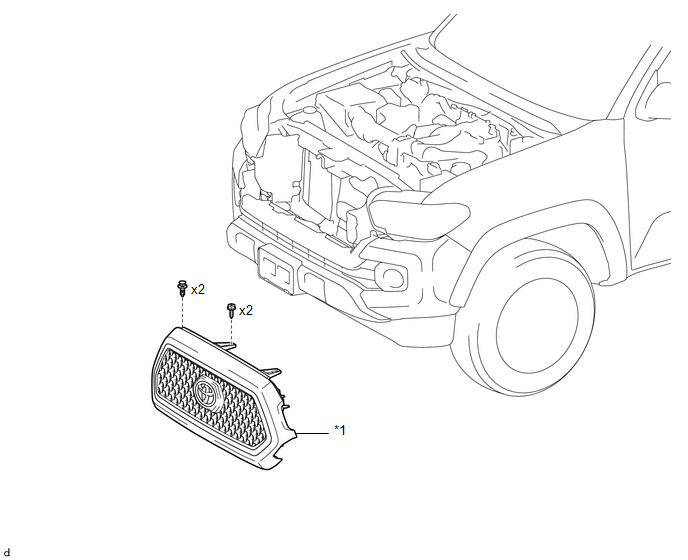
|
*1 |
RADIATOR GRILLE |
- |
- |
ILLUSTRATION
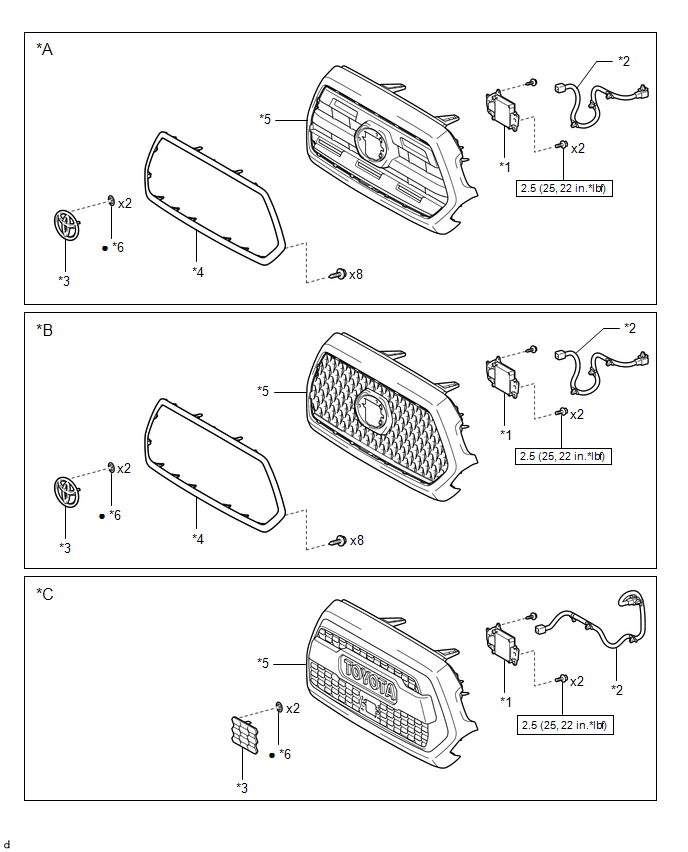
|
*A |
for Type A |
*B |
for Type B |
|
*C |
for Type C |
- |
- |
|
*1 |
MILLIMETER WAVE RADAR SENSOR ASSEMBLY |
*2 |
MILLIMETER WAVE RADAR WIRE |
|
*3 |
NO. 1 RADIATOR GRILLE GARNISH |
*4 |
RADIATOR GRILLE MOULDING |
|
*5 |
RADIATOR GRILLE SUB-ASSEMBLY |
*6 |
SPRING NUT |
|
N*m (kgf*cm, ft.*lbf): Specified torque |
● |
Non-reusable part |
Radiator Grille
RemovalDtc Check / Clear
DTC CHECK / CLEAR
1. CHECK DTC
(a) Connect the Techstream to the DLC3.
(b) Turn the ignition switch to ON.
(c) Turn the Techstream on.
(d) Enter the following menus: Body Electrical / Smart Access or Main Body /
Trouble Codes.
(e) Check the details of the DTC(s) (See page
).
2. CLEAR DTC ...
Rear Sensor Communication Malfunction (C1AED)
DESCRIPTION
This DTC is stored when there is an open or short circuit in the communication
line between the rear sensors and the ECU, or when there is a malfunction in a rear
sensor.
DTC No.
DTC Detection Condition
Trouble Area
C1AED
...
Diagnosis System
DIAGNOSIS SYSTEM
1. DESCRIPTION
(a) To check DTCs, connect the Techstream to the Data Link Connector 3 (DLC3)
of the vehicle. The Techstream displays DTCs and freeze frame data. The DTCs and
freeze frame data can be cleared with the Techstream (See page
).
2. NORMAL MODE AND CHECK MODE
(a) ...