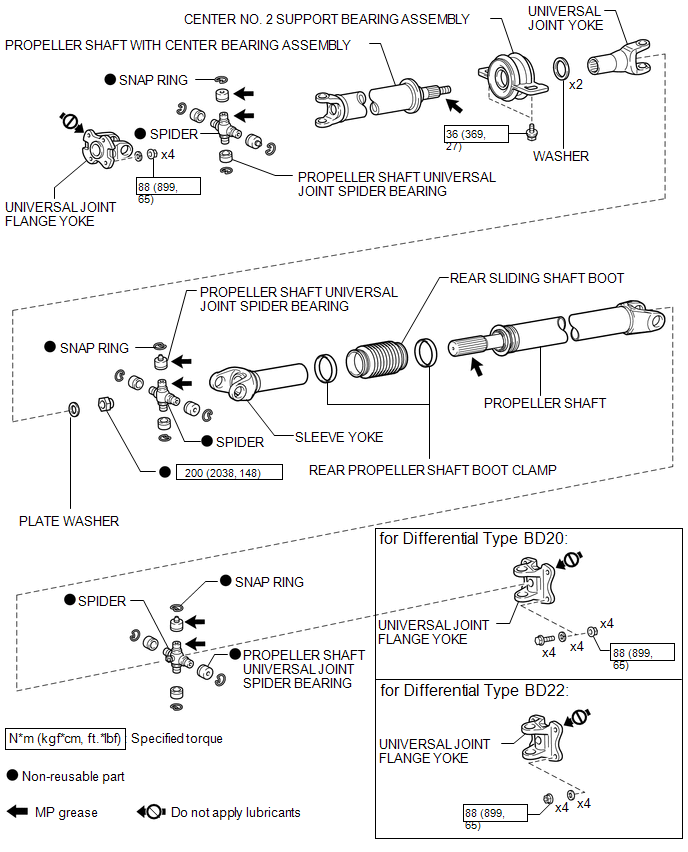
COMPONENTS
ILLUSTRATION
Related Tacoma materials
Yaw Rate Sensor Malfunction (C1436)
DESCRIPTION
The skid control ECU (master cylinder solenoid) receives signals from the yaw
rate and acceleration (airbag sensor assembly) via the CAN communication system.
The airbag sensor assembly has a built-in yaw rate and acceleration sensor and
detects the vehicle's condition using 2 ...
Problem Symptoms Table
PROBLEM SYMPTOMS TABLE
NOTICE:
When replacing the skid control ECU (brake actuator assembly), sensor, etc.,
turn the ignition switch off.
HINT:
Use the table below to help determine the cause of problem symptoms.
If multiple suspected areas are listed, the potential causes of the s ...
Components
COMPONENTS
ILLUSTRATION
*A
w/ Fuel Tank Cover
*B
for Hydraulic Brake Booster
...