
Toyota Tacoma (2015-2018) Service Manual: Cargo Light
Components
COMPONENTS
ILLUSTRATION
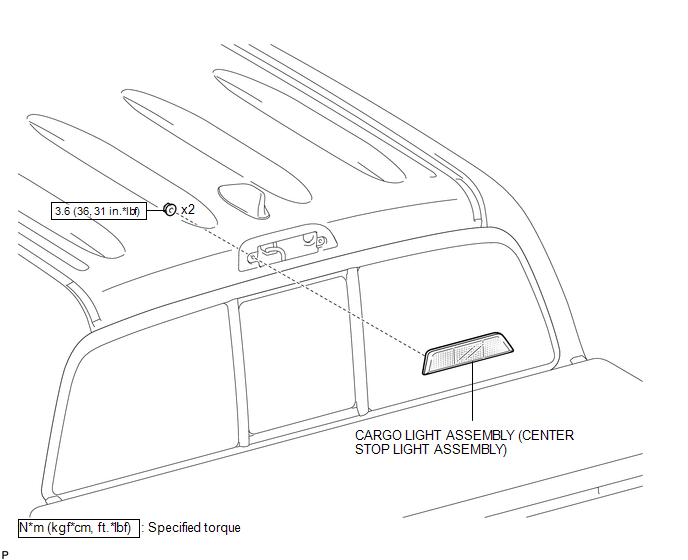
Removal
REMOVAL
PROCEDURE
1. REMOVE ROOF HEADLINING ASSEMBLY
- for Double Cab:
(See page
.gif) )
) - for Access Cab:
(See page
)
2. REMOVE CARGO LIGHT ASSEMBLY (CENTER STOP LIGHT ASSEMBLY)
|
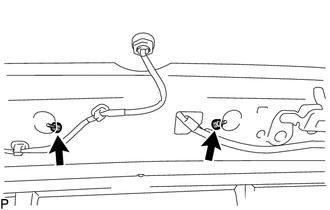
(a) Remove the 2 nuts. |
|
(b) Apply protective tape around the cargo light assembly (center stop light assembly).
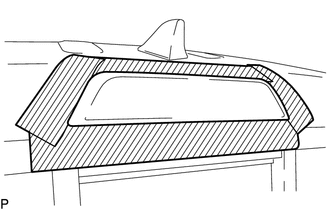 Text in Illustration
.png) |
Protective Tape |
|
(c) Using a moulding remover D, disengage the 2 clips to separate the cargo light assembly (center stop light assembly). |
|
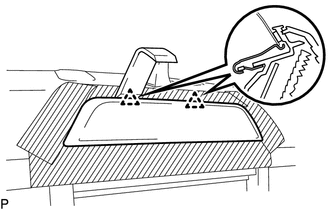
|
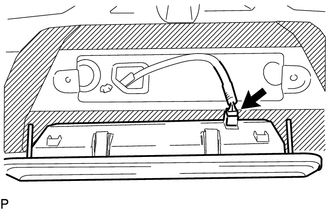
(d) Disconnect the connector to remove the cargo light assembly (center stop light assembly). |
|
Inspection
INSPECTION
PROCEDURE
1. INSPECT CARGO LIGHT ASSEMBLY (CENTER STOP LIGHT ASSEMBLY)
(a) Check the illuminates.
|
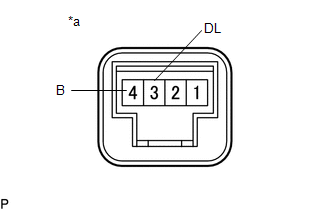
(1) Apply battery voltage to the connector and check the light illumination condition. Text in Illustration
OK:
If the result is not as specified, replace the cargo light assembly (center stop light assembly). |
|
Installation
INSTALLATION
PROCEDURE
1. INSTALL CARGO LIGHT ASSEMBLY (CENTER STOP LIGHT ASSEMBLY)
(a) Connect the connector.
|
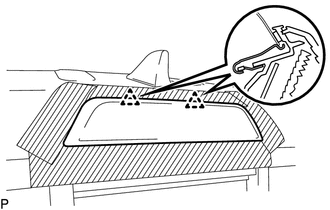
(b) Engage the 2 clips to install the cargo light assembly (center stop light assembly). |
|
(c) Install the 2 nuts.
Torque:
3.6 N·m {36 kgf·cm, 31 in·lbf}
(d) Remove the protective tape.
2. INSPECT ROOF HEADLINING ASSEMBLY
- for Double Cab:
(See page
.gif) )
) - for Access Cab:
(See page
)
 Automatic Light Control Sensor
Components
COMPONENTS
ILLUSTRATION
Installation
INSTALLATION
PROCEDURE
1. INSTALL AUTOMATIC LIGHT CONTROL SENSOR
(a) Engage the 2 claws to install the automatic light control sensor.
2. ...
 Cargo Light Switch
Components
COMPONENTS
ILLUSTRATION
Inspection
INSPECTION
PROCEDURE
1. INSPECT DECK LIGHT SWITCH ASSEMBLY
(a) Check the resistance.
(1) Measure the resistance according to the ...
Other materials:
Installation
INSTALLATION
CAUTION / NOTICE / HINT
PROCEDURE
1. INSTALL REAR AIRBAG SENSOR LH
(a) Check that the ignition switch is OFF.
(b) Check that the cable is disconnected from the battery negative (-) terminal.
CAUTION:
After disconnecting the cable from the terminal, wait for at least 90 seconds
...
Remote Control System does not Operate
DESCRIPTION
The main body ECU (multiplex network body ECU) receives remote control signals
from the driver door key cylinder or wireless transmitter. Then, the main body ECU
(multiplex network body ECU) sends the remote control signals to the sliding roof
ECU (sliding roof drive gear sub-asse ...
Removal
REMOVAL
CAUTION / NOTICE / HINT
CAUTION:
Some of these service operations affect the SRS. Read the precautionary notices
concerning the SRS before servicing.
Click here
PROCEDURE
1. PRECAUTION
NOTICE:
After turning the ignition switch off, waiting time may be required before disconnectin ...
