Toyota Tacoma manuals

Toyota Tacoma (2015-2018) Service Manual: Back-up Light Switch

Components

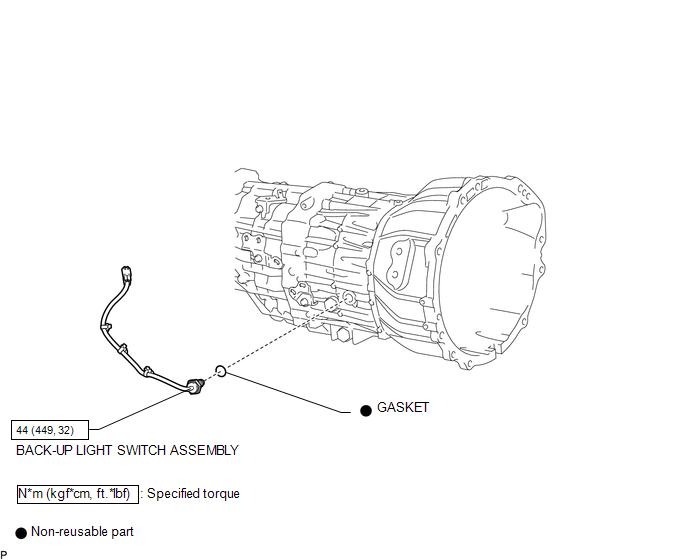
COMPONENTS

ILLUSTRATION
Inspection

Inspection

INSPECTION

PROCEDURE

1. INSPECT BACK-UP LIGHT SWITCH ASSEMBLY

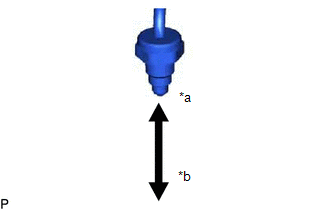
(a) Measure the resistance according to the value(s) in the table below.

Text in Illustration

*a

Pushed

*b

Released

Standard Resistance:

Switch Condition

Specified Condition

Pushed

Below 1 Ω

Released

10 kΩ or higher

If the result is not as specified, replace the back-up light switch assembly.

Removal

REMOVAL

PROCEDURE

1. REMOVE SHIFT LEVER BOOT ASSEMBLY

2. REMOVE BACK-UP LIGHT SWITCH ASSEMBLY 2. REMOVE BACK-UP LIGHT SWITCH ASSEMBLY

2. REMOVE BACK-UP LIGHT SWITCH ASSEMBLY

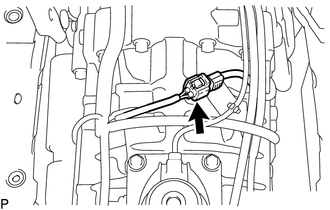
(a) Disconnect the connector.

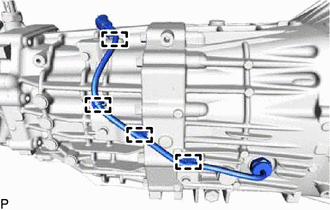
(b) Detach the 4 clamps.

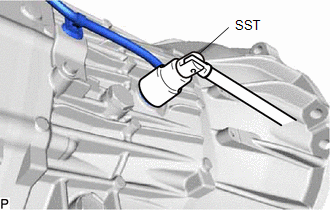
(c) Using SST, remove the back-up light switch assembly and gasket from the transmission case.

SST: 09817-16011

Installation

INSTALLATION

PROCEDURE

1. INSTALL BACK-UP LIGHT SWITCH ASSEMBLY

(a) Using SST, install a new gasket and the back-up light switch assembly to the transmission case.

SST: 09817-16011

Torque:

44 N·m {449 kgf·cm, 32 ft·lbf}

(b) Attach the 4 clamps.

(c) Connect the connector.

2. INSTALL SHIFT LEVER BOOT ASSEMBLY

Counter Gear Counter Gear

Rc62f Manual Transmission / Transaxle
...

Counter Gear
...

Other materials:

How To Proceed With Troubleshooting
CAUTION / NOTICE / HINT HINT: Use these procedure to troubleshoot the seat belt warning system. *: Use the Techstream. PROCEDURE 1. VEHICLE BROUGHT TO WORKSHOP NEXT 2 ...

Wireless Door Lock Buzzer
Components COMPONENTS ILLUSTRATION Removal REMOVAL PROCEDURE 1. REMOVE WIRELESS DOOR LOCK BUZZER (a) Disconnect the connector. (b) Using a clip remover, disengage the clamp to remove the wireless door lock buzzer. Installation ...

Inspection
INSPECTION PROCEDURE 1. INSPECT FRONT NO. 2 SPEAKER ASSEMBLY (a) When there is a malfunction such as noise from a speaker or no sound at all, replace the speaker with a new one and check that the malfunction disappears. OK: Malfunction disappears. HINT: Connect the connectors to th ...

© 2011-2026 Copyright www.ttguide.net