ADJUSTMENT
PROCEDURE
1. REMOVE FRONT CONSOLE BOX
(See page .gif) )
)
2. ADJUST TRANSMISSION CONTROL CABLE ASSEMBLY
(a) Move the shift lever to N.
(b) Disconnect the end of the transmission control cable assembly from the transmission floor shift assembly.
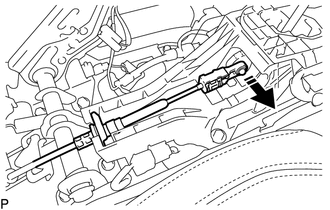 Text in Illustration
.png) |
Disconnect in this Direction |
|
(c) Push the 2 claws together at the top of the transmission control cable lock piece. While holding the 2 claws together, push the 2 lugs on the bottom of the lock piece toward each other and upward to pull out the lock piece. Text in Illustration
|
|
.png)
(d) Connect the end of the transmission control cable assembly to the transmission floor shift assembly.
.png) Text in Illustration
Text in Illustration
|
*1 |
Lock Piece |
|
|
Connect in this Direction |
NOTICE:
- Check that the park/neutral position switch and shift lever are in N.
- Make sure that the lock piece is pulled up.
- Push on the end of the cable all the way to the base of the transmission floor shift assembly pin.
|
(e) Push the lock piece into the adjuster case. Text in Illustration
NOTICE: Securely push in the lock piece until it locks. |
|
.png)
(f) After adjusting the shift lever position, check the operation and function of the shift lever. If there is a problem, adjust the position again.
3. INSTALL FRONT CONSOLE BOX
(See page )