REMOVAL
CAUTION / NOTICE / HINT
NOTICE:
Release the vacuum from booster by depressing the brake pedal several times.
Then remove the brake master cylinder from brake booster.
PROCEDURE
1. PRECAUTION
NOTICE:
After turning the ignition switch off, waiting time may be required before disconnecting the cable from the negative (-) battery terminal. Therefore, make sure to read the disconnecting the cable from the negative (-) battery terminal notices before proceeding with work.
Click here .gif)
2. DISCONNECT CABLE FROM NEGATIVE BATTERY TERMINAL
NOTICE:
When disconnecting the cable, some systems need to be initialized after the cable is reconnected.
Click here
3. DRAIN BRAKE FLUID
NOTICE:
Immediately wash off any brake fluid that comes into contact with any painted surfaces.
4. REMOVE CLUTCH RESERVOIR TUBE (for Manual Transmission)
|
(a) Disconnect the clutch reservoir tube from the reservoir. |
|
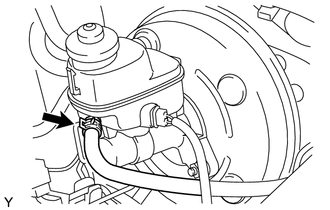
5. REMOVE BRAKE MASTER CYLINDER SUB-ASSEMBLY
|
(a) Disconnect the brake fluid level warning switch connector. |
|
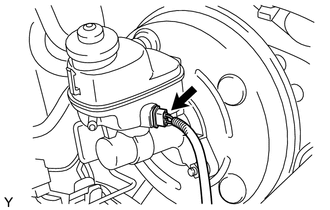
|
(b) Using a union nut wrench, disconnect the 2 brake lines from the brake master cylinder sub-assembly. |
|
.png)
|
(c) Remove the 2 nuts, and then pull the brake master cylinder sub-assembly out of the brake booster. |
|
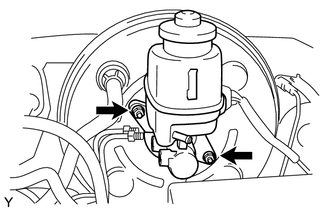
(d) Remove the O-ring from the brake master cylinder sub-assembly.
NOTICE:
- The master cylinder requires careful handling. Do not allow the master cylinder to receive any impact, such as from being dropped. Do not reuse a master cylinder that has been dropped.
- Do not strike or pinch the master cylinder piston, and do not cause any damage to the master cylinder piston by any other means.
- Release the vacuum from booster by depressing the brake pedal several
times.
Then remove the brake master cylinder from brake booster.
- When installing the brake master cylinder sub-assembly onto the brake booster, or when removing the brake master cylinder sub-assembly from the brake booster, make sure that the brake master cylinder sub-assembly is kept horizontal or its tip faces downward (the piston faces upward) to prevent the master cylinder piston from falling off.
- Do not allow any foreign objects to contaminate the master cylinder piston. If a foreign object gets on the piston, remove it by using a piece of cloth and then apply an even layer of lithium soap based glycol grease around the circumference (sliding part) of the piston.
- Do not use any other type of grease or fluid.