Toyota Tacoma manuals

Toyota Tacoma (2015-2018) Service Manual: Removal

REMOVAL

PROCEDURE

1. REMOVE INSTRUMENT PANEL SUB-ASSEMBLY

(See page ) ) )

2. REMOVE NO. 3 HEATER TO REGISTER DUCT

3. REMOVE INSTRUMENT PANEL WIRE ASSEMBLY

3. REMOVE INSTRUMENT PANEL WIRE ASSEMBLY

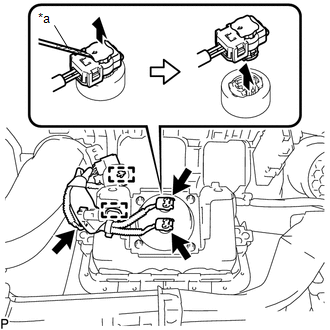
(a) Using a screwdriver with its tip wrapped in protective tape, release the 3 airbag connector locks.

Text in Illustration

*a

Protective Tape

(b) Disconnect the 3 airbag connectors.

NOTICE:

When handling the airbag connector, take care not to damage the airbag wire harness.

(c) Disengage the 2 clamps to remove the instrument panel wire assembly.

4. REMOVE INSTRUMENT PANEL PASSENGER AIRBAG ASSEMBLY WITHOUT DOOR

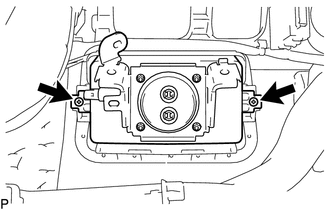
(a) Remove the 2 screws.

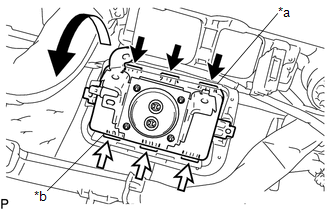
(b) Disengage the 3 hooks (A).

Text in Illustration

*a

Hooks (A)

*b

Hooks (B)

(c) Disengage the 3 hooks (B) to remove the instrument panel passenger airbag assembly without door from the instrument panel.

On-vehicle Inspection
ON-VEHICLE INSPECTION PROCEDURE 1. INSPECT INSTRUMENT PANEL PASSENGER AIRBAG ASSEMBLY WITHOUT DOOR (for Vehicle not Involved in Collision) (a) Perform a diagnostic system check (See pa ...

Disposal
DISPOSAL CAUTION / NOTICE / HINT CAUTION: Before performing pre-disposal deployment of any SRS part, review and closely follow all applicable environmental and hazardous material regulations. Pre ...

Other materials:

Diagnostic Trouble Code Chart
DIAGNOSTIC TROUBLE CODE CHART Dynamic Radar Cruise Control System DTC No. Detection Item Link C1A02 Vehicle Information Not Obtained C1A0A Front Radar Sensor Region Code Mismatch ...

No Response from Steering Lock ECU (B2786)
DESCRIPTION This DTC is stored when LIN communication between the certification ECU (smart key ECU assembly) and steering lock ECU (steering lock actuator or upper bracket assembly) stops for 10 seconds or more. DTC No. DTC Detection Condition Trouble Area ...

Active head restraints (Access Cab and Double Cab models only)
When the occupant’s back presses against the seatback during a rear-end collision, the head restraint moves slightly forward to help reduce the risk of whiplash on the seat occupant. ■Active head restraints Even small forces applied to the seatback may cause the head restraint to mov ...

© 2011-2026 Copyright www.ttguide.net