Toyota Tacoma manuals

Toyota Tacoma (2015-2018) Service Manual: Removal

REMOVAL

CAUTION / NOTICE / HINT

HINT:

If the bumper is damaged, there is a possibility that the installation area of the blind spot monitor sensor may be deformed and the blind spot monitor system may not operate correctly, so visually inspect the blind spot monitor sensor installation area (frame, stud bolt) to make sure it is not dented or bent.

Click here

If the visual inspection finds a problem, check the installation condition of the blind spot monitor sensor, and adjust the installation position of the blind spot monitor sensor as necessary.

PROCEDURE

1. REMOVE REAR BUMPER ASSEMBLY

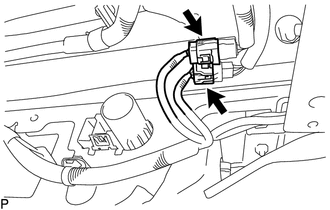
(a) Disconnect the 2 connectors.

(b) Using an engine lifter or equivalent, remove the 6 bolts.
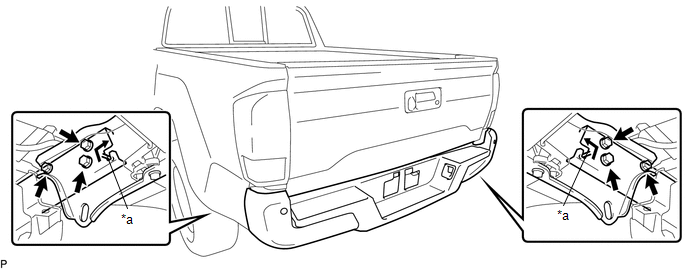
Text in Illustration

*a

Pin

-

-

(c) Disengage the 2 pins to remove the rear bumper assembly.

NOTICE:

  • Using plate lift attachments or equivalent, set the rear bumper assembly on a flat surface.
  • Be sure to perform the operation with 2 persons or more.
  • Be careful not to damage the rear bumper assembly.
Components
COMPONENTS ILLUSTRATION ILLUSTRATION ILLUSTRATION ILLUSTRATION ...

Disassembly
DISASSEMBLY PROCEDURE 1. REMOVE REAR BUMPER HOLE COVER (a) Disengage the 2 clips to remove the rear bumper hole cover. 2. REMOVE REAR BUMPER PA ...

Other materials:

Additional Key cannot be Registered
DESCRIPTION If additional registration is not possible, a malfunction in the certification ECU (smart key ECU assembly), engine switch, electrical key transmitter sub-assembly or steering lock ECU (steering lock actuator or UPR bracket assembly) is suspected. CAUTION / NOTICE / HINT NOTICE ...

Diagnostic Trouble Code Chart
DIAGNOSTIC TROUBLE CODE CHART Rear View Monitor System DTC Code Detection Item See page C1622 Open or Short Circuit in Back Camera Signal ...

Diagnosis System
DIAGNOSIS SYSTEM 1. DESCRIPTION (a) The power window control system data can be read from the Data Link Connector 3 (DLC3) of the vehicle. When the system seems to be malfunctioning, use the Techstream to check for malfunctions and perform repairs. 2. CHECK DLC3 (a) Check the DLC3 (See page ...

В© 2011-2025 Copyright www.ttguide.net