REMOVAL
PROCEDURE
1. PRECAUTION
NOTICE:
After turning the ignition switch off, waiting time may be required before disconnecting the cable from the negative (-) battery terminal. Therefore, make sure to read the disconnecting the cable from the negative (-) battery terminal notices before proceeding with work.
Click here .gif)
2. DISCONNECT CABLE FROM NEGATIVE BATTERY TERMINAL
NOTICE:
When disconnecting the cable, some systems need to be initialized after the cable is reconnected.
Click here
3. REMOVE FRONT WHEELS
4. REMOVE NO. 1 ENGINE UNDER COVER SUB-ASSEMBLY
5. REMOVE NO. 2 ENGINE UNDER COVER SUB-ASSEMBLY (w/ Engine Under Cover No, 2)
6. DRAIN DIFFERENTIAL OIL
7. REMOVE FRONT AXLE SHAFT LH NUT
Click here
8. REMOVE FRONT AXLE SHAFT RH NUT
HINT:
Use the same procedure as for the LH side.
9. SEPARATE FRONT STABILIZER LINK ASSEMBLY LH
Click here
10. SEPARATE FRONT STABILIZER LINK ASSEMBLY RH
HINT:
Use the same procedure as for the LH side.
11. SEPARATE FRONT SPEED SENSOR LH
Click here
12. SEPARATE FRONT SPEED SENSOR RH
HINT:
Use the same procedure as for the LH side.
13. SEPARATE TIE ROD END SUB-ASSEMBLY LH
Click here
14. SEPARATE TIE ROD END SUB-ASSEMBLY RH
HINT:
Use the same procedure as for the LH side.
15. SEPARATE FRONT SUSPENSION LOWER ARM LH
Click here
16. SEPARATE FRONT SUSPENSION LOWER ARM RH
HINT:
Use the same procedure as for the LH side.
17. REMOVE FRONT DRIVE SHAFT ASSEMBLY LH
Click here
18. REMOVE FRONT DRIVE SHAFT ASSEMBLY RH
HINT:
Use the same procedure as for the LH side.
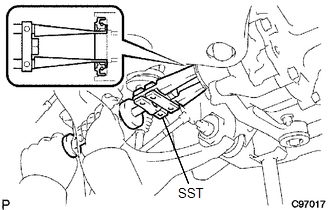
19. REMOVE DIFFERENTIAL SIDE GEAR SHAFT OIL SEAL
|
(a) Using SST, remove the oil seal. SST: 09308-00010 |
|