DISASSEMBLY
PROCEDURE
1. REMOVE SHIFT LOCK RELEASE BUTTON COVER
(a) Using a screwdriver with its tip wrapped in protective tape, detach the 2 claws to remove the shift lock release button cover from the console upper panel sub-assembly.
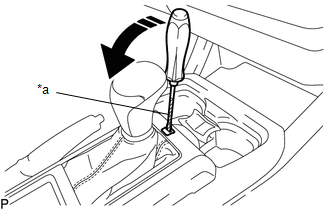
Text in Illustration
|
*a |
Protective Tape |
|
Remove in this Direction |
2. REMOVE SHIFT POSITION INDICATOR
|
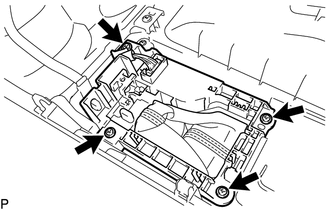
(a) Remove the 4 screws and shift position indicator from the console upper panel sub-assembly. |
|
3. REMOVE INDICATOR LIGHT WIRE SUB-ASSEMBLY
|
(a) Detach the clamp to separate the indicator light wire sub-assembly from the shift position indicator. |
|
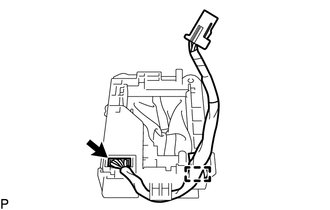
(b) Disconnect the connector to remove the indicator light wire sub-assembly from the shift position indicator.
Components
On-vehicle InspectionDtc Check / Clear
DTC CHECK / CLEAR
1. CHECK DTC
(a) Connect the Techstream to the DLC3.
(b) Turn the ignition switch to ON.
(c) Turn the back sonar or clearance sonar switch assembly on.
(d) Turn the Techstream on.
(e) Enter the following menus: Body Electrical / Intuitive P/A / Trouble Codes.
(f) Check for D ...
How To Proceed With Troubleshooting
CAUTION / NOTICE / HINT
HINT:
Use the following procedure listed to troubleshoot the touch select
2-4 and high-low system.
*: Use the Techstream.
PROCEDURE
1.
VEHICLE BROUGHT TO WORKSHOP
NEXT
...
Diagnostic Trouble Code Chart
DIAGNOSTIC TROUBLE CODE CHART
If a DTC is displayed during the DTC check, check the parts listed in
the table below and proceed to the "See page" given.
*1: "Comes on" means the Malfunction Indicator Lamp (MIL) illuminates.
*2: "DTC stored" means ...