REASSEMBLY
PROCEDURE
1. INSTALL NO. 2 ANTENNA CORD SUB-ASSEMBLY
(a) Using hot-melt glue, install the No. 2 antenna cord sub-assembly as shown in the illustration.
.png)
2. INSTALL NO. 1 ROOF WIRE (w/ Vanity Light)
(a) w/ EC Mirror:
(1) Align the aiming tape as shown in the illustration.
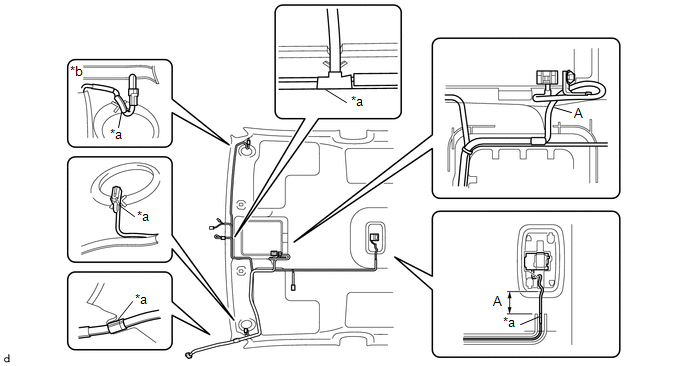
|
*a |
Aiming Tape |
*b |
Adjustment Are |
(2) Using hot-melt glue, install the No. 1 roof wire.
NOTICE:
Do not apply hot-melt glue to the position A shown in the illustration.
HINT:
Use the adjustment area to accommodate any excess length of the No. 1 roof wire.
(b) w/o EC Mirror:
(1) Align the aiming tape as shown in the illustration.
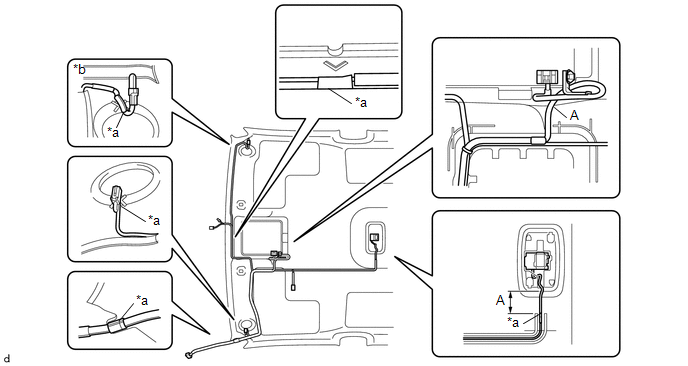
|
*a |
Aiming Tape |
*b |
Adjustment Are |
(2) Using hot-melt glue, install the No. 1 roof wire.
NOTICE:
Do not apply hot-melt glue to the position A shown in the illustration.
HINT:
Use the adjustment area to accommodate any excess length of the No. 1 roof wire.
3. INSTALL NO. 1 ROOF WIRE (w/o Vanity Light)
(a) w/ EC Mirror:
(1) Align the aiming tape as shown in the illustration.
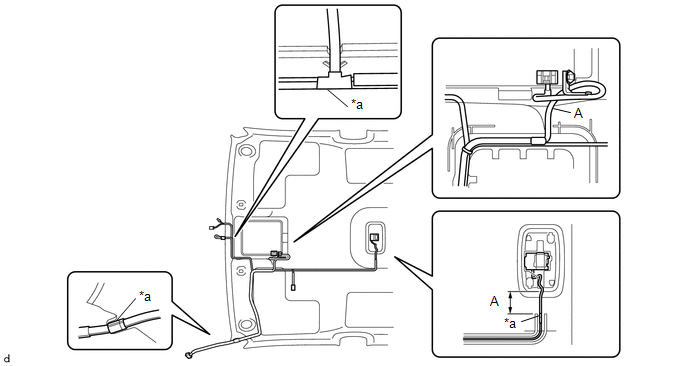
|
*a |
Aiming Tape |
- |
- |
(2) Using hot-melt glue, install the No. 1 roof wire.
NOTICE:
Do not apply hot-melt glue to the position A shown in the illustration.
(b) w/o EC Mirror:
(1) Align the aiming tape as shown in the illustration.
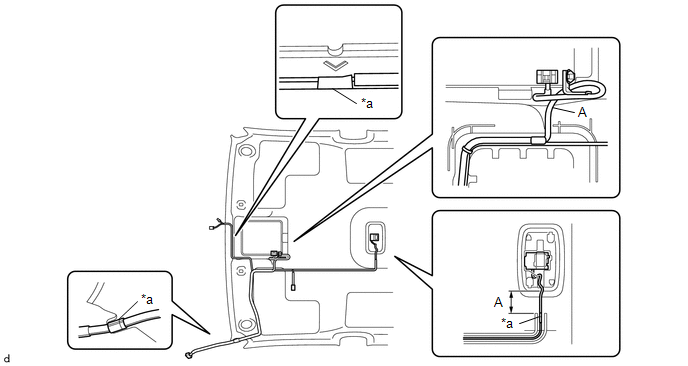
|
*a |
Aiming Tape |
- |
- |
(2) Using hot-melt glue, install the No. 1 roof wire.
NOTICE:
Do not apply hot-melt glue to the position A shown in the illustration.
4. INSTALL MICROPHONE CASE
HINT:
Use the same procedure for Double Cab.
Click here .gif)
5. INSTALL TELEPHONE MICROPHONE ASSEMBLY
Click here