Components
COMPONENTS
ILLUSTRATION
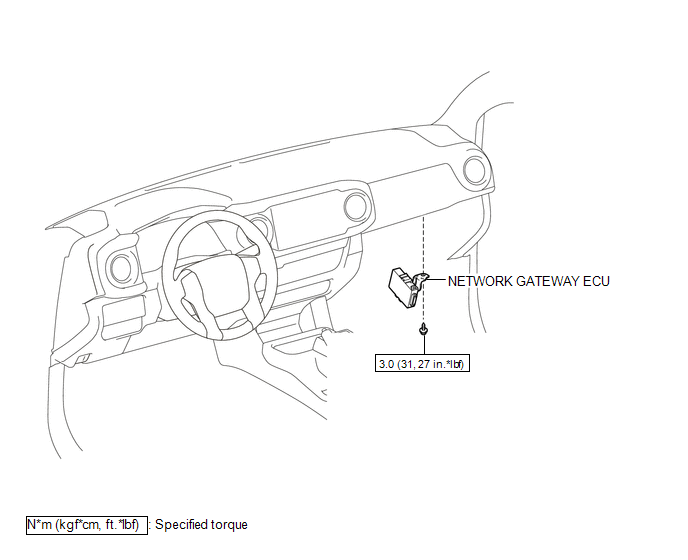
Installation
INSTALLATION
PROCEDURE
1. INSTALL NETWORK GATEWAY ECU
(a) Install the network gateway ECU with the bolt.
Torque:
3.0 N·m {31 kgf·cm, 27 in·lbf}
(b) Connect the connector.
2. INSTALL LOWER INSTRUMENT PANEL ASSEMBLY
(See page
)
Removal
REMOVAL
PROCEDURE
1. REMOVE LOWER INSTRUMENT PANEL ASSEMBLY
(See page
)
2. REMOVE NETWORK GATEWAY ECU
|
(a) Disconnect the connector. |
|
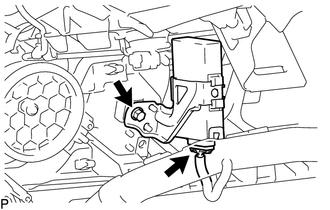
(b) Remove the bolt and network gateway ECU.
Tire Pressure Monitor ECU Communication Stop ModeLow Output Signal of Rear Speed Sensor RH (Test Mode DTC) (C1273,C1274,C1403,C1404)
DESCRIPTION
Refer to DTCs C1401 and C1402 (See page ).
DTC Code
DTC Detection Condition
Trouble Area
C1273
C1274
Stored only during test mode.
Rear speed sensor RH/LH
Rear speed sensor rotor RH/LH (rear ax ...
Navigation Receiver Assembly Communication Stop Mode
DESCRIPTION
Detection Item
Symptom
Trouble Area
Navigation Receiver Assembly Communication Stop Mode
Either condition is met:
Communication stop for "Display and Navigation (AVN1)" is indicated
on the "C ...
Removal
REMOVAL
CAUTION / NOTICE / HINT
HINT:
Use the same procedure for both the LH and RH sides.
The procedure described below is for the LH side.
PROCEDURE
1. REMOVE FRONT BUMPER ASSEMBLY
(See page
)
2. REMOVE HEADLIGHT ASSEMBLY
(a) Apply protective tape around the headlight ...